Call Transcription (Cloud-Based)
OpenAI Whisper (Cloud-Based)
To utilize OpenAI's cloud transcription service, you will need an OpenAI account and an API key. Follow the steps below to set up and integrate OpenAI Whisper with your system.
Step 1: Create an OpenAI Account
- Navigate to the OpenAI platform.
- Create a new account or log in using your Google, Microsoft, or email credentials.
Step 2: Retrieve Your API Key
- Once logged in, go to the API Keys page.
- Generate a new secret key.
- Securely copy the API key. Note: This key will only be displayed once, so ensure you store it safely.
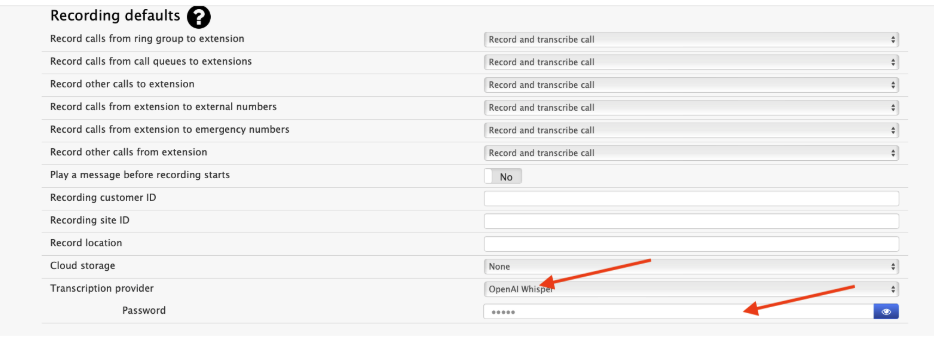
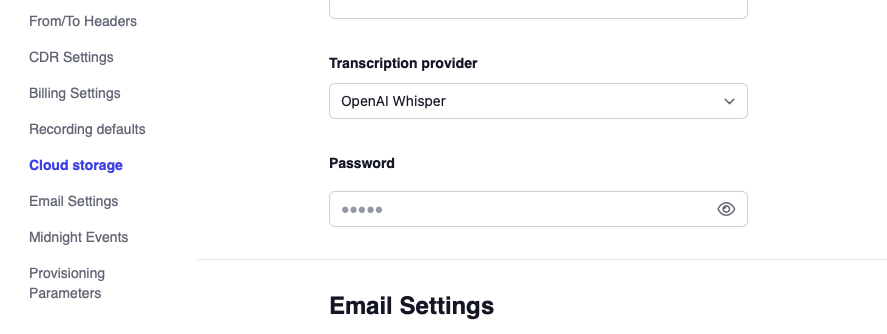
Step 3: Integrate with Vodia
- Log in to your Vodia tenant account.
- Navigate to the General Settings.
- Enable the Transcription feature.
- Input the OpenAI API key you retrieved in Step 2.
- Version 69
- Version 70
Accessing Call Transcriptions
To view the transcribed content, simply log in to your user portal, navigate to the 'History' section, select the desired call, and then examine the 'call content' area.

Additional Notes
- Ensure that your OpenAI account has sufficient credits or a valid subscription to use the API.
- Keep your API key secure and avoid sharing it publicly.
For more detailed instructions, refer to the OpenAI documentation.