Odoo Cloud Integration
This integration connects Vodia PBX with Odoo CRM using XML-RPC protocol, allowing call data to be automatically logged in Odoo. The integration creates and updates contacts, logs calls as messages and associates call information with existing CRM leads and helpdesk tickets.
It is important that telephone numbers in Odoo are stored in the format that the PBX uses. For US numbers this format is a 10-digit format (for example, 6173998147). This is because telephone numbers need to match exactly in ActiveCampaign.
Enhance your experience by using this integration with our click-to-dial and web portal features
Requirements
- You will need your Odoo URL, database name, username, and password. Make sure the user has the necessary permissions for the Contacts, CRM, and Helpdesk modules.
Integration Setup
-
In the tenant's Advanced section, navigate to CRM Integration, then select Odoo Cloud. Select the extensions (or group of extensions) that should have this integration activated.
-
In the user portal, you should find Odoo integration in the left side list of integrations under settings. Here, you will configure your Odoo credentials:
- Enter your username (this is usually your email address).
- Provide your Odoo database name.
- Enter the URL for your Odoo instance.
- Input the API Key for that user.
- You can get the API Key in your Odoo account in "My Profile", tab "Account Security", New API Key. Give it a friendly name, duration and make sure to save it because you won't see it again.
-
Once successfully connected:
- Call number (incoming or outgoing) will be searched in Odoo, and if found presented in the user portal with the name, which you can click to get to that lead or contact's page for getting or adding or modifying the call details.
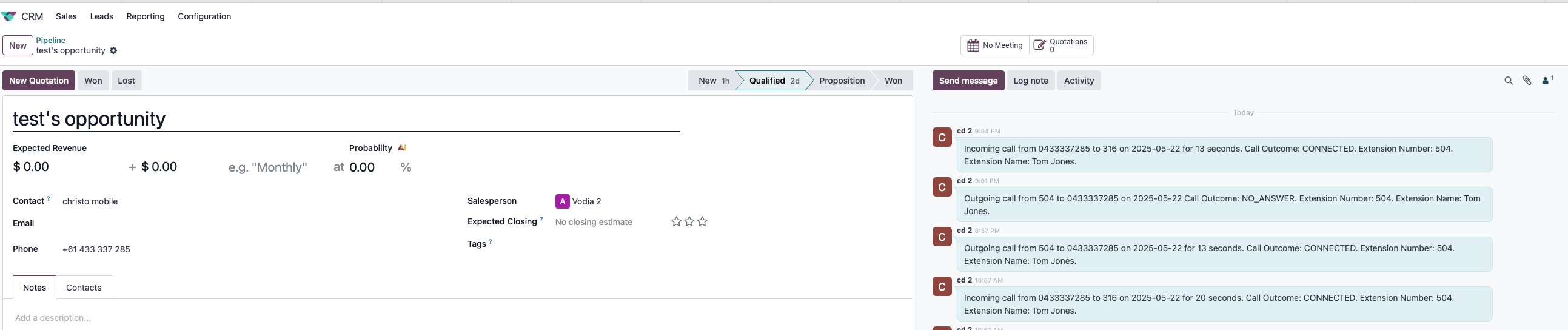
- Tha call will also be logged with from, to, time, duration, call recording link (if recorded), missed, whether the call was transferred from/to another agent etc.
Calls will be displayed in Odoo.


Integration Features
- Automatic lead or contact search and show in user portal with name and link to that page
- Call logging in contact records
- Integration with CRM leads and opportunities
- Integration with helpdesk tickets
- Support for outbound, inbound, and voicemail calls
- Call outcome and duration tracking