Conference Rooms
Conference rooms are used to mix audio of multiple parties into a conference call. The conference is hosted on the PBX, for the participants the call appears as regular call into an account of the system.
Many VoIP phones can host conferences on the device, e.g. bridge two calls into a three-party-conference. Some devices are even able to bridge moe than two calls. These calls appear on the telephone system as regular calls without being aware that a conference call is going on.
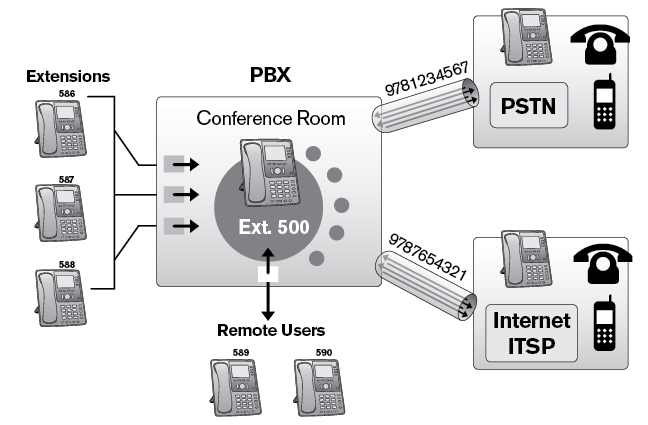
Conferences can have regular participants and moderators. Moderators have the possbility to mute participants, end the call and other special rights (see below). It is possible to have multiple moderators in a conference call.
The system is able to mix the audio of larger number of participants, depending on the used hardware. While the number of participants has implications on the use of CPU resources, the problem of noise accumulation becomes another limiting factor for large conferences. A participant that calls from a busy street might ruin the voice quality for all participants. Because of this it is recommended that all participants mute their devices and un-mute them only when they want to provide input into the call.
The conference room does not mix video. There are other tools available that also take care about whiteboarding, conference invitations and so on. Please contact a Vodia representative and ask for solutions that work well with the Vodia PBX.
List of Conference Rooms
When clicking on the conference rooms navigation item, the system shows the rooms that are available in the tenant. The list contains the account number of the node, the name, the type and the number of calls that are currently active in the room. Clicking on the number will edit the room.
Adding a Conference Room
- In the account number(s) field, enter an account number. If you wish to give the room multiple names, use a semiconon to seperate the numbers. You can also use phone numbers (DID) as number.
- In the display name field, enter a descriptive name for the room.
- The system will automatically generate a profile picture for the conference room. If you can, use a different picture for the room.
- If you want to use settings from another conference room, you can have those settings being cloned from that room in the clone settings from account field.
Conference Room Settings
Identity
Account Number(s): The number or numbers assigned to this account.
Conference name: A descriptive name for the account.
Short name: A short name for the account. This short name is used in places where there is not much space, for example on soft labels of certain VoIP phones.
Note field: A general purpose for taking notes on the account. This field is not used by the PBX and it is only visible to the administrator.
Outbound number (ANI): The conference room uses an ANI (automatic number identification) when sending a caller to an external number. For more information, see Trunk ANI.
Dial plan for outbound calls: The group uses this dial plan to route a call that does not go to an extension. By default, this is the dial plan of the tenant.
Profile picture: You can load a new profile picture for the group.
Account class name: The account class name for the ring group, which can be used for billing purposes.
Behavior
Mode: This setting defines the overll behavior of the conference room.
- Ad-hoc conference: In this mode, conferences set up by dialing into the conference room.
- Scheduled conference: In this mode, conference calls are scheduled in advance for a specific date and time.
- Call participants when entering: The system will call a list of predefined participants when one of the participants calls into the conference.
IVR language: This setting defines what language is used when annoucements are made, unless the "languages offered on start" are used. By default, the setting of the tenant are used.
Languages offered on start: This settings containts a list of languages that are offered when the caller enters the conference. If the list is empty, the IVR language will be used.
Before entering the conference: In preparation of entering the conference room, the system can inform other partipants about the caller. The system can ask the caller to leave a name (followed by teh #sign), play a short tone or don't play any annoucements.
Moderator access code: For ad-hoc conference calls, this code is used to admit the caller into the conference room and identify that caller as moderator.
Participant access code: For ad-hoc conference calls, this code is used to admit the caller into the conference room as regular participant. If there is no code, anyone can get into the conference room without further checks.
Number of digits for access code (4-9): For scheduled conferences, this settings defines how many digits should be used to generate conference access codes.
Numbers to call when entering the conference: The system will call the provided numbers up and put them into the conference room when the first person enters the conference.
Record the conference: If this flag is turned on, calls in the conference room are recorded. The calls will be stored like automatically recorded calls. Users need the permission to listen to call recordings to access the recording. This setting does not apply to scheduled conferences where this can be controlled for each call.
Compress recordings: When the conference is being recorded, this settings defines if the audio should be compressed or not. Compressing the recording reduces the space required on the disk, but it reduces the quality and increases the amount of CPU needed for this task.
Music on hold source: When participants are waiting, for example until a moderator dials into the conference, this setting defines what music to hear.
Maximum number of participants: This setting limits how many participants can be in the call.
Entering conference: This setting defines the behavior at the beginning of the call:
- Start the conference without moderator: The call starts as soon as two participants are in the call.
- Mute all participants: The calls starts immediately, but all participants are muted and need to unmute themselves before audio becomes available.
- Mute all participants until moderator enters the conference: The call starts when the moderator enters the call.
- Mute all participants until moderator un-mutes the conference: The call starts when the moderator enters the call and explicitly un-mutes the call.
Exiting conference: There are severl choices about exiting the conference:
- Continue the conference: When the moderator leaves the conference, the conference continues.
- Mute all participants on exit: When the moderator leaves the conference, all participants are muted.
- Hang up the conference on exit: When the moderator leaves the conference, all calls of the call are disconnected.
Scheduled Conference
A scheduled conference allows users to plan for a conference in advance. Users are informed via email of the time, date, and access code. The access code is unique for the conference room and ensures that no unauthorized users can join the conference. Before users can schedule conferences, the administrator must create at least one conference account. After the account has been created, users can schedule conferences from the Conferences tab from the user portal.
- Login to your user portal by using your extension and password as explained in Login .
- Click the Conferences icon on top right as shown.
- Populate the form using the following information:
Name: This field allows participants to know the subject of the conference.
Date: Enter the date of the conference. Leaving this field blank will automatically schedule your conference for the day you populate the form.
Start and end times: Use the 24-hour format; for example, 14:00 for 2:00 p.m., 14:30 for 2:30 p.m., etc. The system will use the selected time zone of the extension that is logged in. The start and end times must be in the same format.
Participants: Enter extension numbers and/or email addresses. This requires that the system is able to send out emails. When listing multiple email addresses, use a semicolons as a space separator. The email contains a calendar event, which can be read by most scheduling tools. The tool will pop up a conference reminder with the relevant conference information.
Automatically initiate calls at the start time: If this is checked, the Vodia PBX calls each number that is in the participants list at the conference start time.
Record the conference: The recording will be placed into the user's mailbox.
Room: Choose a conference room.
Moderator options: These settings are discussed below.
Entering conference
- Start the conference without moderator: Participants will be able to communicate with each other upon entering the conference.
- Mute all participants until moderator enters the conference: Participants won't be able to communicate with each other until the moderator calls into the conference.
- Mute all participants until moderator unmutes the conference: Participants won't be able to communicate with each other until the moderator unmutes the conference (*8).
Exiting conference
- Continue the conference: Participants will be able to communicate with one another after the moderator has exited the conference. (The conference will not be deleted until after 24 hours.)
- Mute all participants on exit: Once the moderator exits, participants' phones will be muted.
- Hang up the conference on exit: Once the moderator exits, the system will disconnect all participants from the conference call.
The new conference will be displayed under Conferences organized (at the top of the page), listing the moderator and participant PINs. Participants will receive an email that includes conference details, such as date, time, and PIN number.
Once a conference has been created, it cannot be modified; it can only be deleted (click the delete icon in the conference list). Conferences are automatically deleted 24 hours after the conference end time; however, participants who want to continue talking before the conference is deleted can do so as long as the moderator specified Continue the conference as an exiting preference.
Ad Hoc Conference
An ad hoc conference account allows users to hold conferences at a moment's notice. No planning is required, and no emails are sent out. This method of conferencing is handled through the system and produces a high-quality three-way conference. Although this method offers a simple way to hold a conference, unauthorized users will be able to access the conference room if an access code requirement has not been set on the account.
To hold an ad hoc conference, users need to know the extension number that has been reserved for ad hoc conferencing. If the designated extension is 665, then all parties who enter 665 from their extension phones will be joined to the same call. Participants will be required to enter an access code if one has been set; otherwise, they will be joined directly into the conference room. Any number of participants can join the call. Participants can also be transferred into the conference, for example to avoid passing PIN codes to external callers.
Call Up On Entry
When configured to call participants when entering, the system will call all other participants up when on calls into the conference. This is useful in situations when a group of people need to get together when something happens. In contrast to paging, the audio mix is bidirectional, and every particpant can contribute to the call.
The system will call the numbers to call when entering the conference and automatically bring them into the conference. The callers must confirm the call by pressing 1 on their phones.
Moderator Options
When a caller acts as moderator, the following codes are available for moderating the call:
| Code | Behavior | Role |
|---|---|---|
*0 | Send participant list to email address of moderator | Moderator |
*1 | Mute audio | Participant |
*2 | Un-mute audio | Participant |
*7 | Mute all participants except self | Moderator |
*8 | Un-mute all participants | Moderator |
*9 | End the call | Moderator |