Microsoft Teams Direct Routing
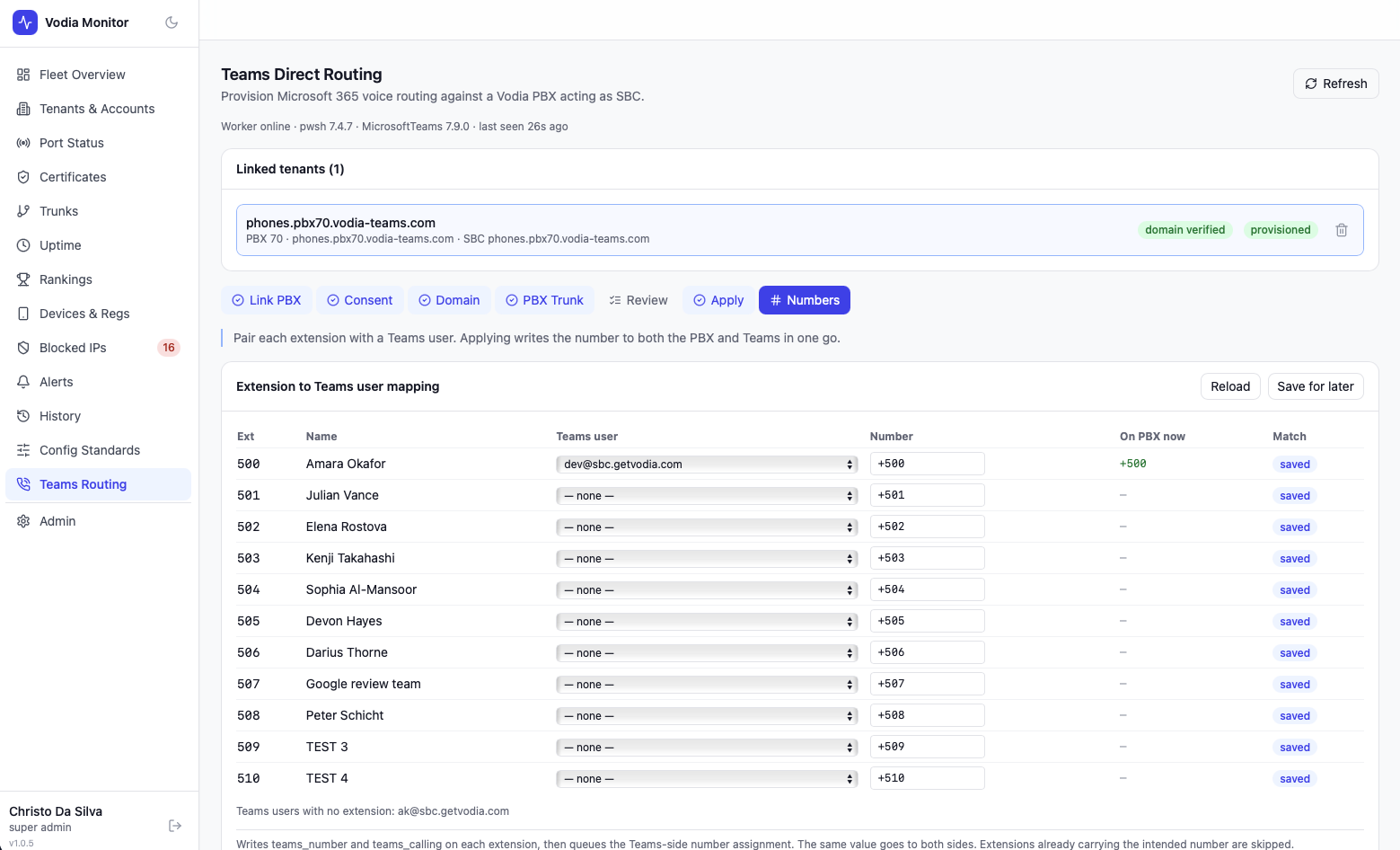
The Teams page provisions Microsoft Teams Direct Routing for a Vodia PBX domain end-to-end — Microsoft 365 admin consent, PBX trunk and dialplan setup, and per-user number assignment — without any manual PowerShell.
This is an add-on module and must be enabled (TEAMS_ENABLED=true in .env) before the page appears in the sidebar. It runs in its own container alongside the main stack and requires network access to Microsoft Graph.
All actions on this page are super admin only and fully audit logged.
Wizard Overview
Provisioning a domain walks through seven steps:
| Step | Purpose |
|---|---|
| Link PBX | Choose the PBX and Vodia domain to provision |
| Consent | Grant Microsoft 365 admin consent via device code |
| Domain | Verify the domain in Microsoft 365 |
| PBX Trunk | Create the Teams trunk and dialplan entry on the PBX |
| Review | Produce a plan of the Microsoft 365 changes required |
| Apply | Apply the plan and provision the Microsoft 365 side |
| Numbers | Match extensions to Teams users and assign numbers |
A tenant link can be re-opened at any time — Monitor picks up at the first incomplete step rather than starting over.
Linking a PBX
Select a PBX server and one of its Vodia domains. Monitor derives default resource names (usage record, voice route, voice routing policy) from the domain and defaults the SBC FQDN to the domain itself, since the SBC's certificate must match the FQDN Teams uses as the PSTN gateway. The FQDN can be overridden if the deployment uses a different signaling host.
A domain can only be linked to one Teams tenant at a time, and it must be a domain the selected PBX actually hosts.
Microsoft 365 Consent
Consent uses the OAuth device code flow: Monitor displays a short code and a Microsoft URL, which an administrator with Global Admin or Teams Administrator rights opens and enters. Monitor polls in the background until consent is granted, then stores an encrypted refresh token for that tenant — no client secret or credential is ever entered into Monitor.
Consent can expire or be revoked; if a Graph call comes back unauthorized, the tenant is flagged and consent must be re-run.
Domain Verification
Once consent is granted, Monitor checks whether the domain is present and verified in Microsoft 365. If it isn't, Monitor can add it and retrieve the DNS TXT/MX verification records to give the customer. Verification is checked on demand — it's normal to see unverified immediately after adding a new domain while DNS propagates.
PBX Trunk Provisioning
This step configures the Vodia PBX side:
- Creates (or detects an existing) Teams trunk of type
optionswith a proxy pointing atsip.pstnhub.microsoft.com - Duplicates the domain's dialplan as a domain-local copy if it's currently using the global dialplan, so the Teams routing entry doesn't affect other domains
- Splices a
[teams]entry into the dialplan at the lowest preference - Repoints the domain's
default_dialplanto the updated dialplan
This runs inline against the PBX's REST API — it doesn't require the pwsh worker to be available.
Plan & Apply
Plan builds a diff between the desired Microsoft 365 state (gateway FQDN, ports, media bypass, voice route, voice routing policy) and what's actually configured, without changing anything. The result is a change list — create, update, or none — with a from → to value for anything that will change.
Apply commits that plan through the PowerShell bridge (MicrosoftTeams module). Apply is guarded by a plan hash: if the desired state or user list has changed since the plan was generated, the apply is rejected as stale and the plan must be re-run. Only one run can be in flight per tenant at a time; abandoned runs older than the configured PowerShell timeout are automatically marked failed rather than left stuck.
Every run's PowerShell event log and diagnostics are available in an expandable panel for troubleshooting.
Number Mapping
Once the Microsoft 365 side is provisioned, extensions are matched to Teams-licensed users:
- Matching is automatic where an extension's stored email matches a Teams user's UPN
- Unmatched rows can be assigned manually from the list of Teams Phone-licensed users
- Numbers default to
+<extension>but can be overridden per row - Applying writes
teams_numberandteams_callingon the PBX extension, then queues the corresponding Teams-side number assignment — both sides always carry the same value - Extensions that already carry a different number are flagged as conflicts and are left alone unless Replace existing numbers is chosen explicitly
The Teams-side number assignment runs asynchronously through the worker; the PBX side applies immediately and shows a per-extension result (changed / unchanged / failed).
Troubleshooting
- Module shows as disabled — confirm
TEAMS_ENABLED=trueand that theteamsworker container is running (vm-status). - Worker heartbeat missing — the status panel reports the worker's own heartbeat, not a local
pwshcheck; a stale or absent heartbeat means theteamscontainer isn't up. - Consent expired — Graph calls returning unauthorized will prompt re-consent; existing trunk/dialplan configuration on the PBX is unaffected.
- Apply rejected as stale — the desired state or user list changed after the plan was generated; re-run Review and apply the fresh plan.