Settings
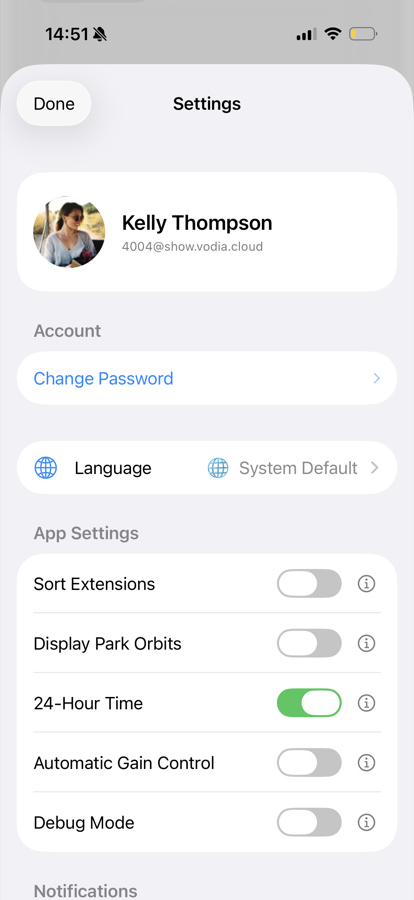
Open the settings from your card on the Extensions tab. At the top you see your profile — picture, name and account — followed by these sections:
Account
Change Password — set a new password for your account. Enter it twice to confirm.
Language
Choose the app language, or leave it on System Default to follow your iOS language. Available languages: English, German, Spanish, French, Chinese (Simplified), Italian, Greek, Portuguese, Finnish and Dutch.
App Settings
Each of these toggles has an ⓘ button that explains the setting inside the app:
- Sort Extensions — sort the extensions list by name instead of by number
- Display Park Orbits — show parked calls on your card, so you can pick them up from the app
- 24-Hour Time — show times in 24-hour format
- Automatic Gain Control — automatically level out your microphone volume during calls
- Debug Mode — collect extra diagnostic information; only enable this when support asks you to
Notifications
These three switches control where your incoming calls ring. They match the settings in the PBX user portal, so a change here applies everywhere:
- Call the app — ring this app
- Call desktop phone — ring your desk phone, if you have one
- Call cell phone — ring the cell phone number stored for you on the PBX
Actions
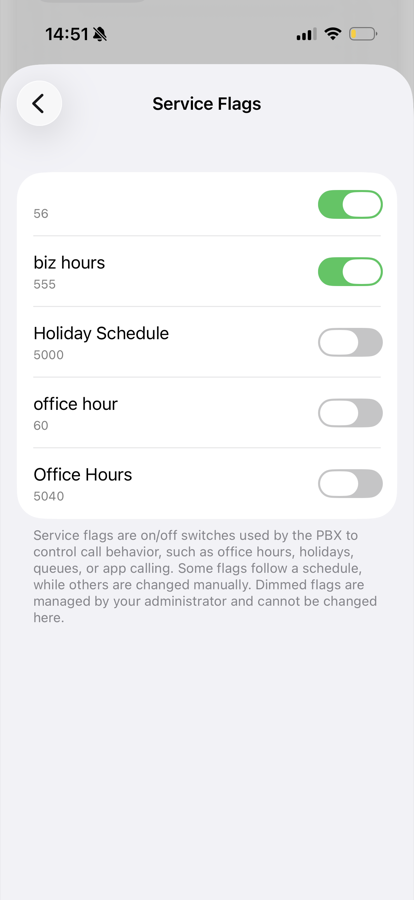
Service Flags — view and switch the service flags you have permission to control, for example a night-mode flag for the office.
Logout
Signs you out and removes the account from the phone. The app asks for confirmation first.
About
The footer shows the app version, and the country and area code the PBX uses for displaying phone numbers.