Sharing Transcriptions
Vodia Analytics lets you share call details, recordings, transcripts, and AI analysis with anyone via a secure one-time link — no login required.
How It Works
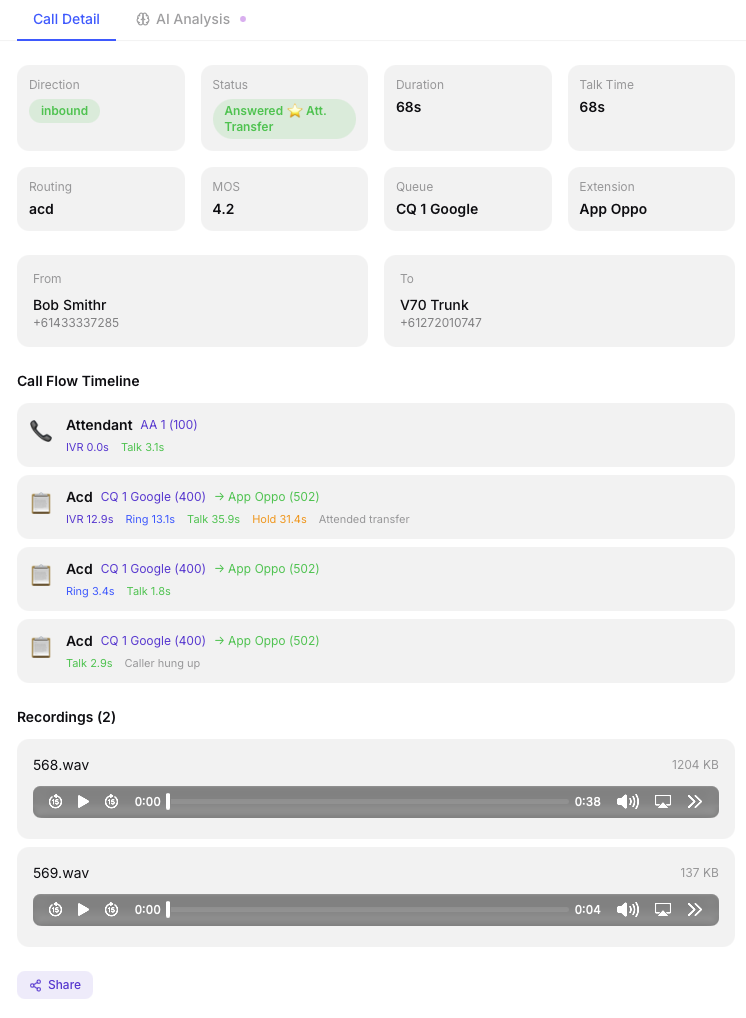
- Open any call in the Call Detail Modal
- Click the Share button in the modal footer.
- A unique link is generated (e.g.
https://your-domain.com/share/abc123...) - Copy the link or email it directly (if SMTP is configured)
Link Properties
- One-time use — the link is invalidated after the first view
- 24-hour expiry — even if unused, the link expires after 24 hours
- No authentication — anyone with the link can view it, no login needed
- Full context — the shared page includes call metadata, recordings (with playback), transcript (with caller/agent separation), and AI analysis
What the Recipient Sees
The shared page is a clean, standalone view optimized for readability (light mode by default). It includes:
- Call direction, time, duration, and parties
- Audio player for recordings
- Full transcript with caller/agent separation (for stereo recordings)
- AI summary, sentiment, topics, action items, and resolution status
Emailing Links
If SMTP is configured (see Admin → SMTP Settings ), you can email the share link directly from the modal. Enter the recipient's email address and an optional note — the link and call summary are sent via your configured mail server.
Managing Share Links
Admins can view and revoke active share links in Admin → Share Links. This shows all unexpired, unused links with the ability to revoke any of them immediately.