Compliance & QA
The Compliance page provides automated call compliance monitoring, PII/PCI transcript redaction, and AI-powered agent QA scorecards. Every transcribed call is automatically evaluated against your compliance rules, sensitive data can be stripped from transcripts before storage, and a configurable sample of calls receives a full AI quality assessment.
The page is available to all users from the sidebar. Viewing results is scoped by role: viewer and admin users see their assigned tenants, and queue_manager users see only calls answered in their assigned queues. Managing rules and settings requires the admin or super_admin role; editing the global defaults and creating global rules is restricted to super_admin.
How It Works
When a call recording is transcribed, the platform runs a compliance pipeline in the worker:
- Redaction — if enabled, sensitive data (card numbers, emails, etc.) is stripped from the transcript before it is stored. Originals are never kept.
- Compliance evaluation — the transcript is checked against all applicable rules. Text rules (contains/regex) are evaluated instantly at zero cost; all AI-paraphrase rules for a call are batched into a single AI request regardless of how many exist.
- QA scoring — a random sample of calls (per-tenant percentage) is scored against the QA rubric via the configured AI provider.
Results are stored on the call and surfaced on the Calls page (Score column and Violations filter), in the Call Detail Modal (full violation and scorecard panels), and on the Compliance Overview.
Compliance rules and settings are dual-layered. With a tenant selected in the sidebar, you edit that tenant's rules and settings. On All Tenants, you edit the global defaults that every tenant inherits. Global rules (super admin only) are evaluated for every tenant in addition to the tenant's own rules, and tenant settings override the global defaults where set.
Overview Tab
The Overview shows compliance and QA activity for the selected tenant and date range:
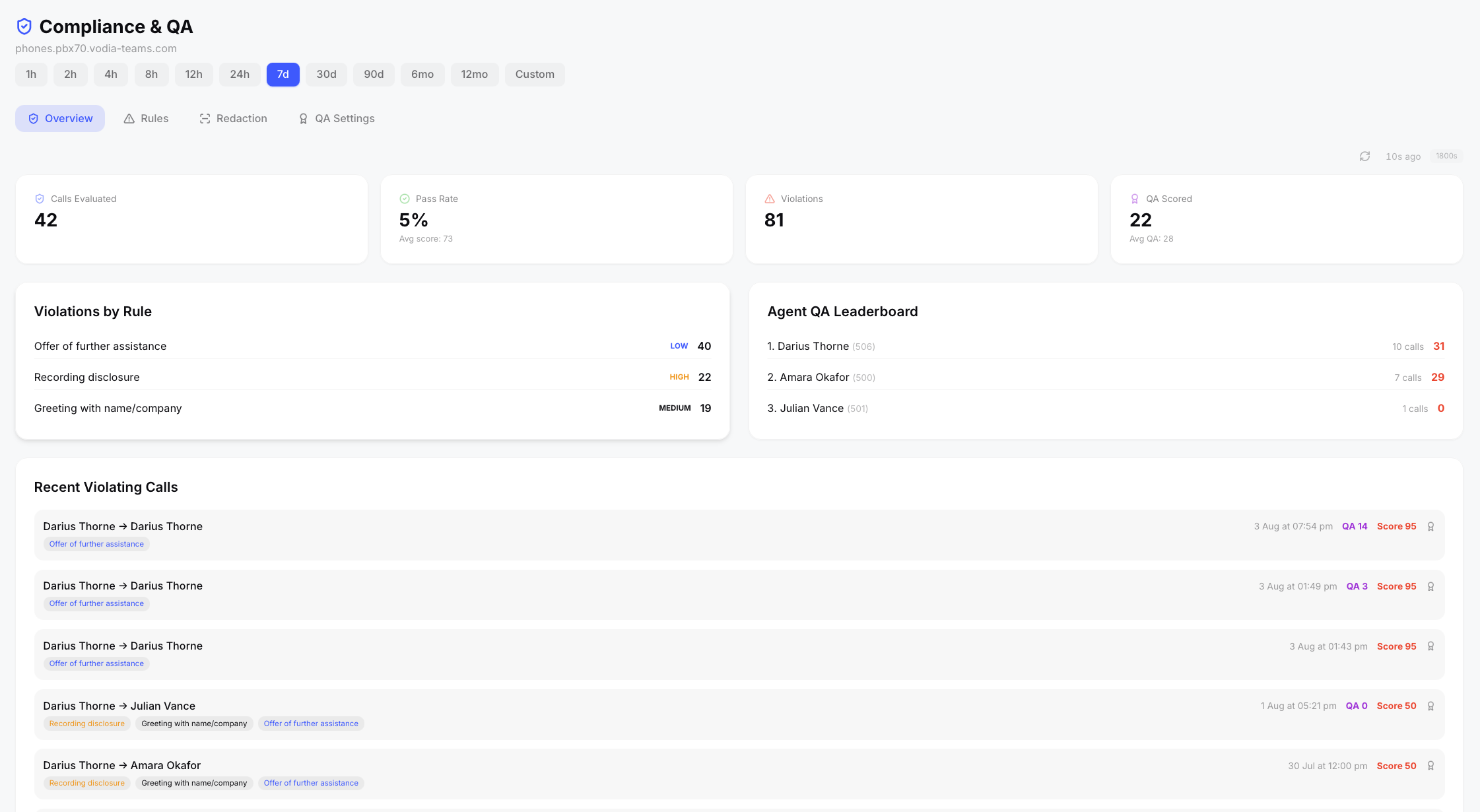
- KPIs — calls evaluated, pass rate with average score, total violations, and QA-scored call count with average QA score
- Violations by Rule — which rules are being violated most, with severity badges
- Agent QA Leaderboard — agents ranked by average QA score, with the number of scored calls
- Recent Violating Calls — the latest failing calls with their violation badges (hover for evidence). Clicking a call opens it directly in the Call Detail Modal on the AI tab. An award button on each row queues on-demand QA scoring for that single call.
The Overview auto-refreshes every 30 minutes (pausable), with a manual refresh button — the same behavior as the Dashboard.
If any AI-mode rules could not be evaluated (for example, the AI provider was unreachable), a yellow banner shows the affected call count so failures are never silent.
Re-evaluate Historical Calls
New rules only apply to new transcriptions automatically. To apply your current rules to existing calls, use Re-evaluate Range. This queues throttled background jobs (max 5,000 calls per run) for every transcribed call in the selected tenant and date range, so large backfills trickle through without impacting the server. Optionally tick Also run QA scoring to force a QA scorecard on every call in the range — note this uses one AI request per call.
Rules Tab
Compliance rules come in two types:
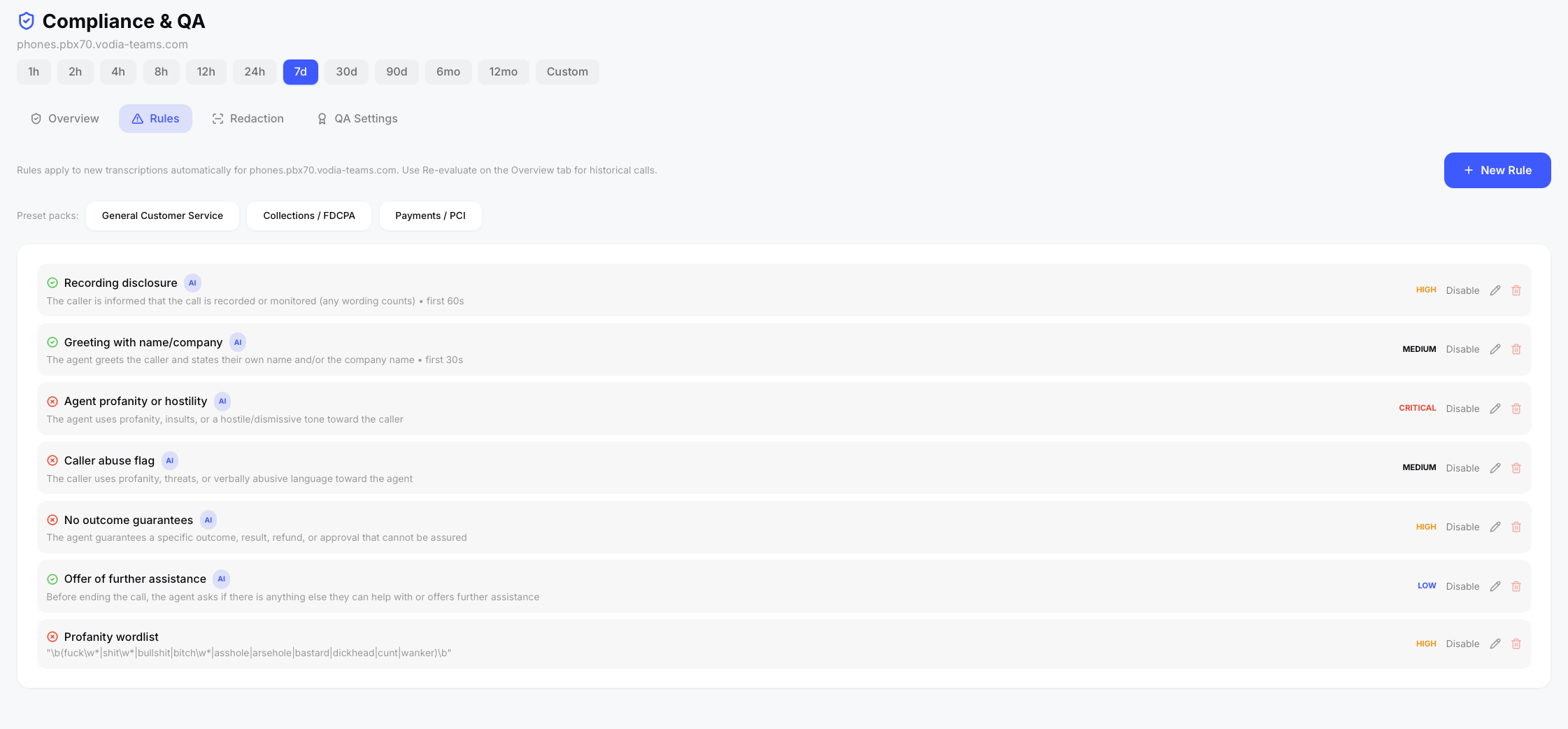
- Required phrase — something that must be communicated on the call (e.g. a recording disclosure). Optionally restricted to the first N seconds of the call.
- Prohibited phrase — something that must not occur (e.g. profanity, outcome guarantees).
Each rule has a match mode:
| Mode | Cost | Behavior |
|---|---|---|
| Contains | Free | Case- and punctuation-insensitive text match. Phrases are matched across transcription segment boundaries, so a disclosure split across two segments still matches. |
| Regex | Free | Case-insensitive regular expression — ideal for word lists (e.g. profanity) or wording variants. |
| AI paraphrase | Uses tokens | The AI judges whether the meaning was communicated, so "this call is recorded", "we record our calls for training", and "you're on a recorded line" all satisfy the same rule. All AI rules for a call are evaluated in one batched request. |
Describe the behavior, be explicit about who it applies to, and keep one obligation per rule. "The agent uses profanity toward the caller" will not flag a swearing caller — create a separate rule for caller abuse if you want both. For literal word lists, prefer regex mode: it is deterministic and free.
Rules can also be filtered by direction (inbound/outbound/internal), channel, queue, or extension, and carry a severity that determines the score penalty:
| Severity | Penalty |
|---|---|
| Low | −5 |
| Medium | −15 |
| High | −30 |
| Critical | −100 |
Each call starts at 100 and loses points per violation; a call passes only with zero violations.
Preset Packs
Three one-click preset packs seed a tenant with ready-made rules (a tenant must be selected; rules with matching names are skipped, so re-running is safe):
- General Customer Service — recording disclosure, greeting with name/company, agent hostility, caller abuse flag, no outcome guarantees, offer of further assistance, and a regex profanity word list
- Collections / FDCPA — mini-Miranda disclosure, recording disclosure, no false legal/arrest threats, no third-party debt disclosure, no harassment or intimidation
- Payments / PCI — payment consent obtained, no read-back of full card numbers, never request PIN or password, payment confirmation offered
Presets are a starting point — review severities and descriptions and adjust for your obligations.
Redaction Tab
PII/PCI redaction strips sensitive data from transcripts before storage — originals are never kept (destructive by design). Audio recordings are not modified. Redaction applies to new transcriptions only; already-stored transcripts are immutable.
Detection categories (per-tenant checkboxes):
- Credit/debit card numbers — 13–19 digit runs validated with the Luhn checksum, so order numbers and phone numbers are not falsely redacted. Card numbers read out in chunks across transcription segments are detected on the joined channel text and redacted everywhere.
- CVV / security codes — 3–4 digits in context ("the security code is 321")
- Social Security Numbers (US format)
- Email addresses
- Dates of birth (in context)
Redacted transcripts show tokens such as [CARD REDACTED] or [EMAIL REDACTED] in place of the sensitive data, and record per-category redaction counts.
Strict Digit Redaction
Speech-to-text occasionally mangles spoken numbers — a 16-digit card can be transcribed as 12 digits, which fails Luhn validation and would otherwise slip through. Strict digit redaction additionally redacts any run of N or more digits, regardless of validity.
- Recommended setting: 12 — catches mangled card numbers while leaving 10-digit phone numbers intact
- Trade-off — order/account references of that length are also redacted; at 10 or below, most phone numbers are too
- Default: 0 (off)
QA Settings Tab
AI QA scorecards evaluate agent performance against a weighted rubric. The default rubric covers Greeting & Introduction, Listening & Empathy, Professionalism & Tone, Knowledge & Accuracy, Resolution Effectiveness, and Call Closing — each category is editable, weighted, and can be added or removed (weights should total 100).
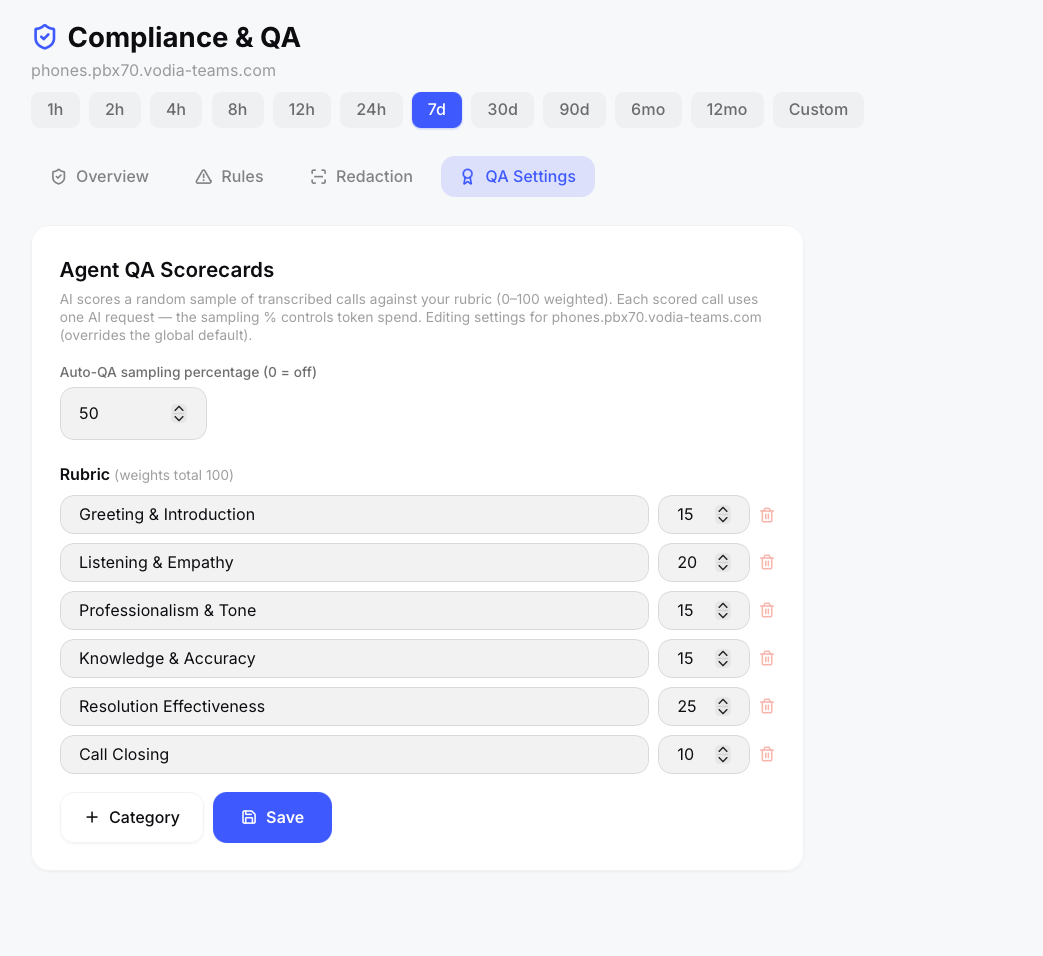
The AI scores each category 0–100, produces a weighted overall score, identifies the agent's strengths, and generates one specific, actionable coaching tip per call.
Sampling percentage controls token spend: at the default 20%, roughly one in five newly transcribed calls is scored automatically (each scored call is one AI request). Set to 100 while testing, or 0 to disable automatic scoring. Calls can also be scored on demand from the Overview's award button or included in a Re-evaluate Range run.
QA results appear on the Overview leaderboard, as purple QA chips on the Calls page, and as the full scorecard in the Call Detail Modal.
AI Provider
AI-paraphrase rules and QA scoring use the AI provider configured in Admin → AI Settings — the same provider as auto-summarize. Text-mode rules (contains/regex) and redaction work without any AI provider and at zero cost.
Scheduled Briefings
Recurring AI briefing reports (daily/weekly/monthly email delivery) are managed in Admin → Briefings.