Calls
The Calls page is a searchable, filterable CDR browser that gives you access to every call processed by the platform.
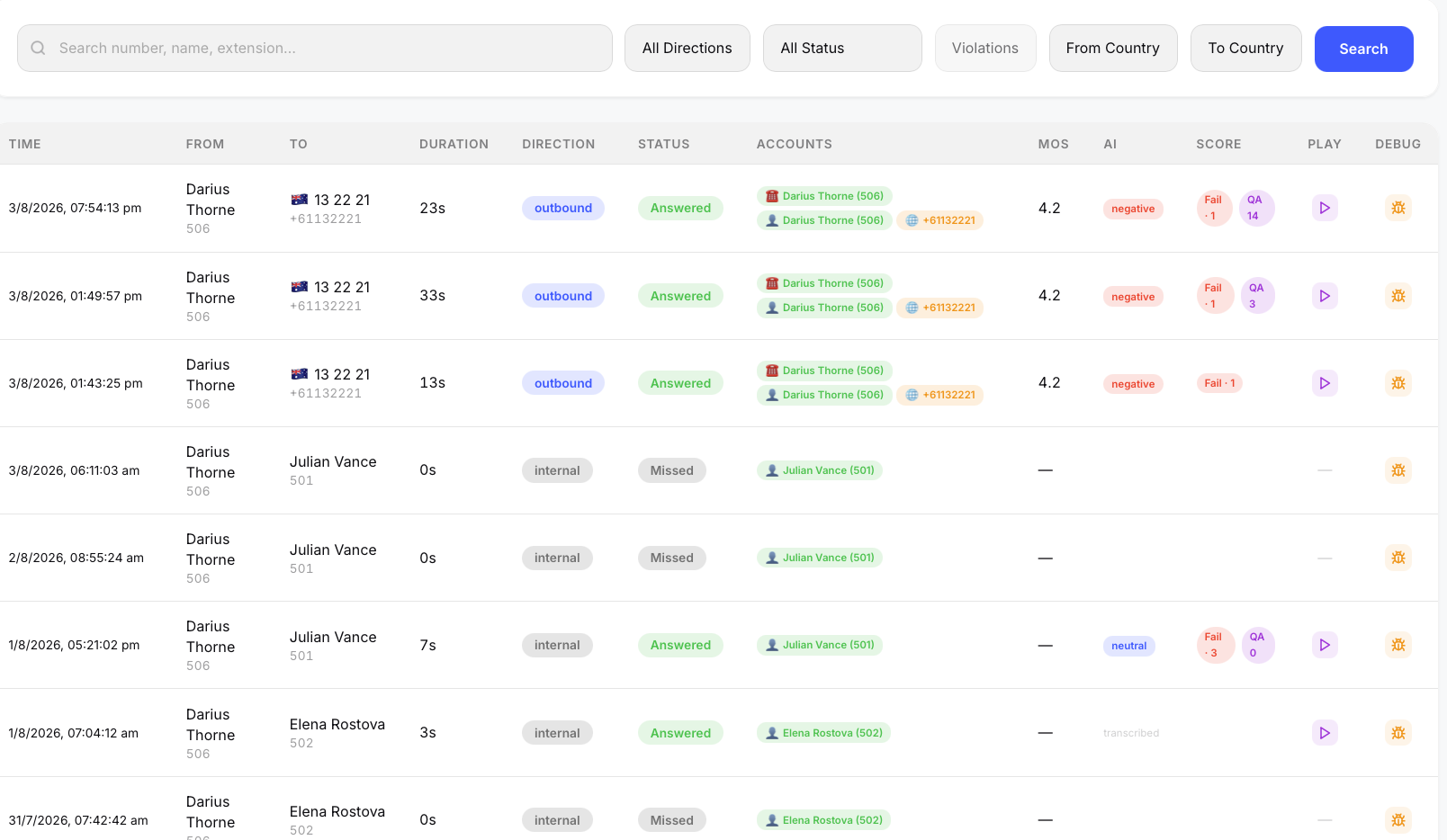 The Calls page showing the CDR list with filters and state tags.
Search and Filters
The search bar at the top supports free-text search across caller number, callee number, extension names, and the accounts field from the CDR. Below the search bar, filter dropdowns let you narrow results by:
- Direction — inbound, outbound, internal
- Status — answered, not answered, missed, abandoned, attended transfer, blind transfer, forwarded
- From Country — filter by caller's country (dynamically populated from call data)
- To Country — filter by destination country (dynamically populated from call data)
- Violations — a toggle that shows only calls with compliance violations, turning the Calls page into a compliance review queue. See Compliance & QA for details.
All filters combine with the global date range. Results are paginated with configurable page sizes.
Call List Columns
Each row in the call list shows:
| Column | Description |
|---|---|
| Time | Call start time in the browser's local timezone |
| Tenant | PBX domain (visible when viewing all tenants) |
| From | Caller name and number with country flag emoji (e.g. 🇦🇺) |
| To | Callee name and number with country flag emoji |
| Duration | Actual talk time (excluding ring/hold) |
| Direction | Inbound / Outbound / Internal with color-coded badge |
| Status | Answered / Abandoned / Missed badge. Additional badges for: Att. Transfer (purple), Blind Transfer (blue), Forwarded (orange) |
| Accounts | Account codes from the CDR, with color-coded state-type badges showing the routing path |
| MOS | Voice quality score (color-coded: green ≥ 4.0, orange ≥ 3.0, red < 3.0) |
| AI | Sentiment badge (positive/negative/neutral) if AI summary is enabled, or transcription status |
| Score | Compliance and QA scores. A green Pass or red Fail · n badge shows the compliance result (hover to see which rules were violated), and a purple QA n chip shows the AI QA score when the call has been scored. Empty when the call has not been evaluated. |
| Play | Opens the Call Detail Modal on the Transcript tab and starts playback immediately, so the transcript follows along as the recording plays. Shown only when the call has a recording. |
| Debug | Opens debug panel showing raw CDR logs, SIP packets, and full JSON payload |
Clicking any row opens the Call Detail Modal on the Call Detail tab.
The Play button is the fastest route into a call. Because it lands on the Transcript tab with audio already running, you can skim the highlighted transcript while listening, and click any line to jump to that moment. See Call Detail Modal for the full player controls.
Compliance Score
Calls are automatically evaluated against the tenant's compliance rules after transcription. The Score column summarizes the result:
- Pass (green) — all applicable rules passed
- Fail · n (red) — n rule violations were detected; hover the badge to see the violated rule names
- QA n (purple) — the AI QA scorecard result (0–100), present when the call was included in QA sampling or scored manually
Combine the Violations filter with a date range to review all failing calls for a period. The full violation details and QA scorecard are shown in the Call Detail Modal, where prohibited-phrase violations can be played back from the exact moment they occurred.
Country Detection
Numbers are parsed using Google's libphonenumber library to detect the country of origin and destination. Country flag emojis are displayed next to caller and callee numbers.
- Numbers with
+prefix are parsed directly (e.g.+61433337285→ 🇦🇺 Australia) - Local format numbers use the tenant's configured default country as a hint (e.g.
0433337285with default country AU → 🇦🇺 Australia) - International dialing prefixes are stripped automatically (e.g.
001144207946xxxxwith prefix0011→ 🇬🇧 United Kingdom) - Internal extensions and short codes are detected and skipped
- Country flags can be toggled on/off per tenant in Admin → Tenants
Call Forwarding Detection
Calls that were forwarded are flagged with an orange ↪ Forwarded badge in the Status column. The platform detects forwarding from multiple sources:
- Unconditional forwards — extension call forwarding (reason: unconditional, busy, no-answer)
- Service Flags — Call queues, auto-attendants, ring groups routing to night service destinations
- Overflow/failover — calls redirected due to queue overflow or trunk failover
- SIP Diversion headers — standard SIP forwarding indicators
Forwarded calls store the forward reason, originating account, and destination number for reporting.
Transfer Detection
Call transfers are detected and shown as badges in the Status column:
- 🔀 Att. Transfer (purple) — attended/consultation transfer, where the transferring party spoke to the target before completing the transfer
- 🔀 Blind Transfer (blue) — blind/cold transfer via SIP REFER, where the call is transferred without consultation
Transfer detection uses CDR state reason codes, log messages, and SIP REFER packets in extension legs.
States Tags
The Accounts column displays state-type tags extracted from the CDR's states array. Each routing hop the call took is shown as a colored badge with an emoji icon — for example, a call that went through an auto-attendant, then a call queue, then to an extension would show three tags representing that routing path.
Share Button
The call detail modal includes a Share button that generates a one-time, time-limited link to share the call externally. See Shareable Call Links for details.