Xero
With Xero, Vodia Billing computes the tax and Xero records the figures supplied to it.
This is not a preference. Xero's automated sales tax cannot run on invoices created through its API, so an API-created invoice carries whatever tax figures the caller provides. Vodia Billing therefore has to be the tax authority for a Xero tenant, and the tenant needs a tax profile applied here.
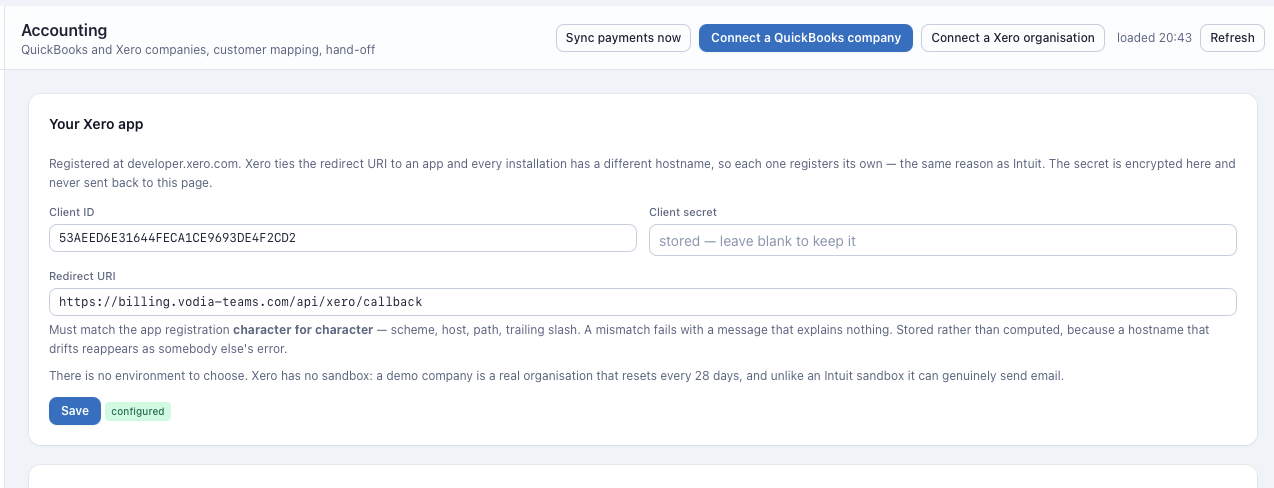
An invoice pushed to Xero is paid in Xero. A customer bound to an organisation is never offered the Stripe Pay button, because a second collection channel against one document is one payment recorded twice.
Setup
1. Register the app
In the Xero developer portal, create an app of type Web app. Register it on your own Xero developer account, one app per install — that matters because of the connection cap described below.
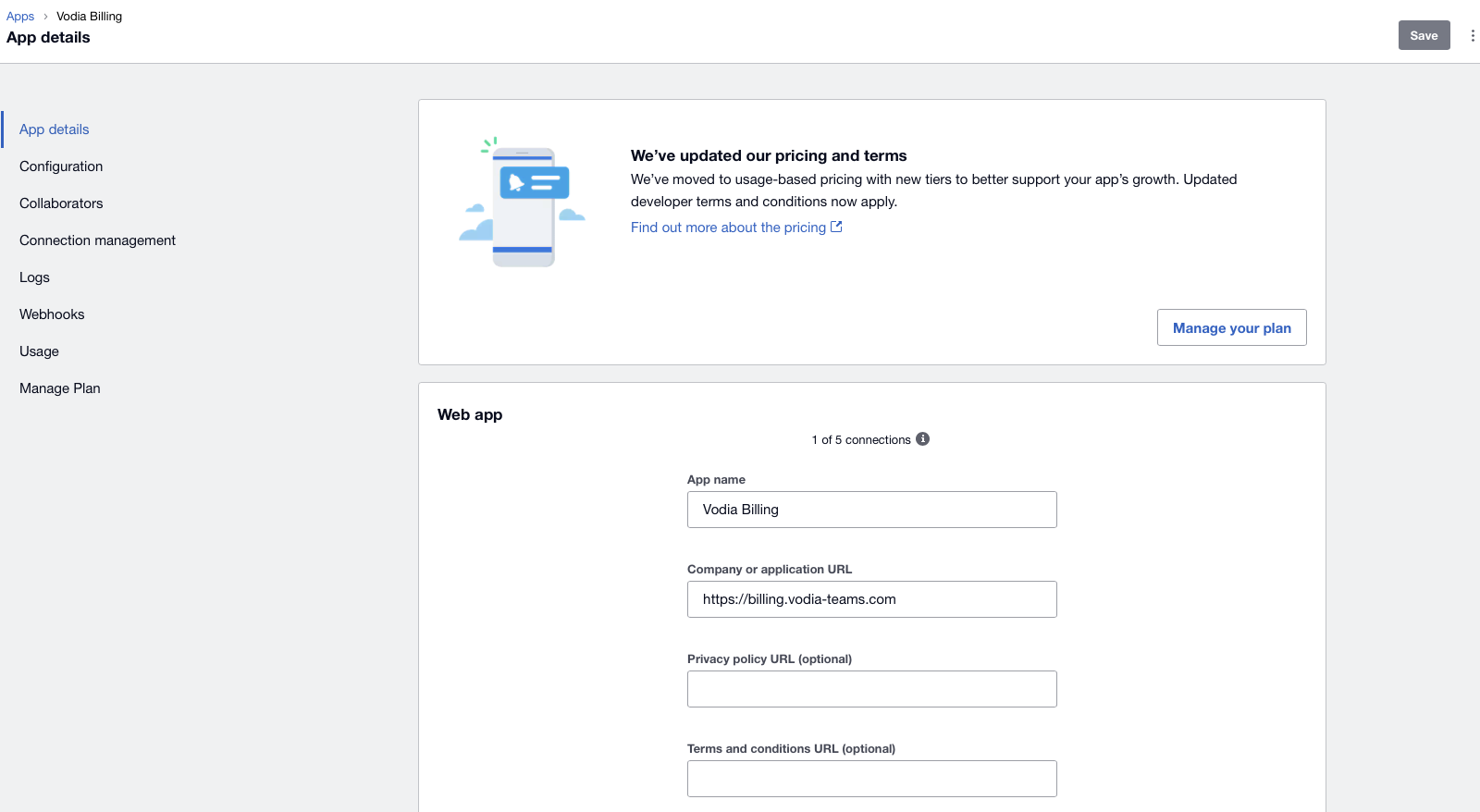
On App details, set the app name and the company or application URL, which is the Vodia Billing base URL:
https://your-domain
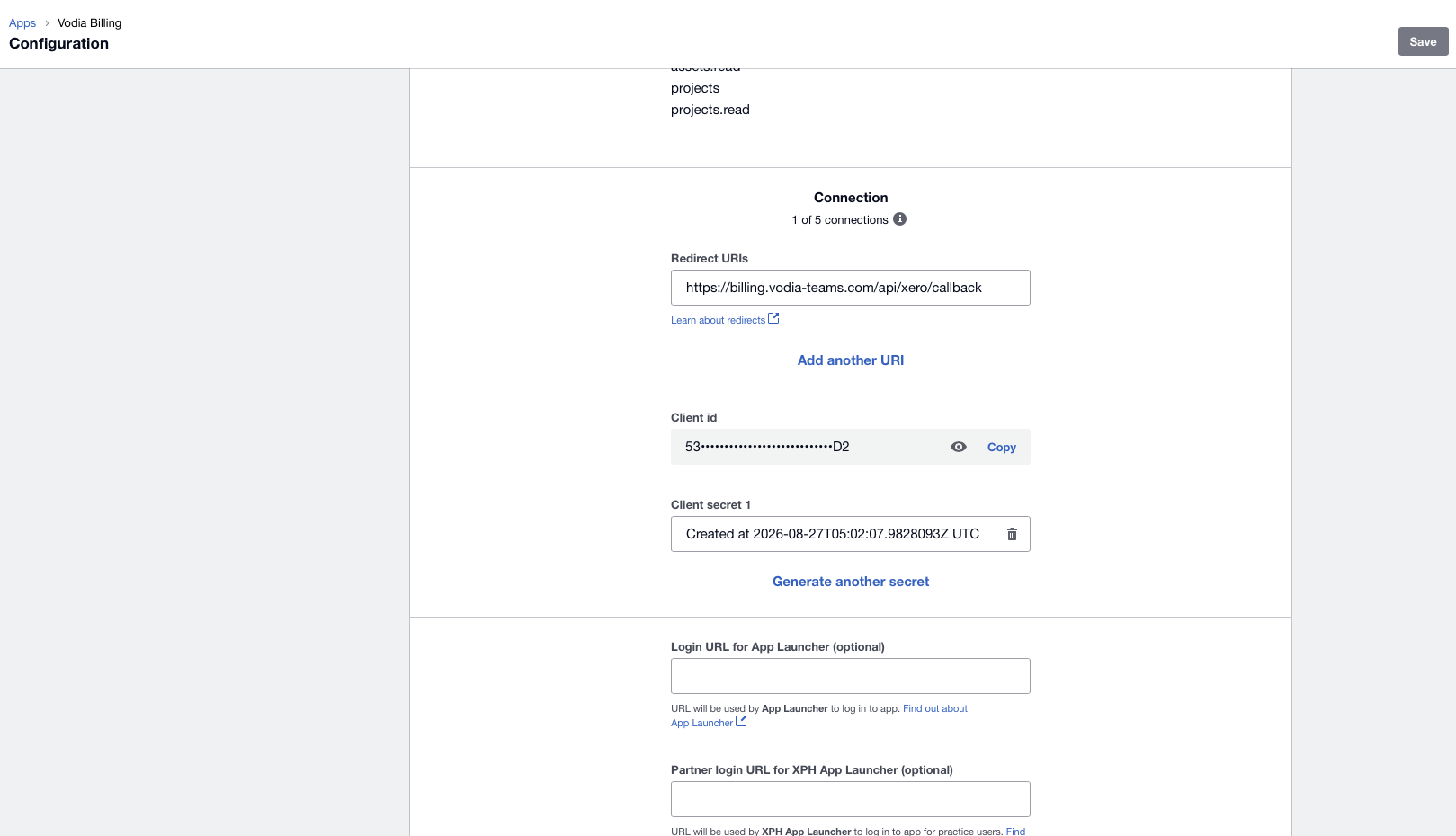
On Configuration, set the redirect URI:
https://your-domain/api/xero/callback
The client ID and the client secret are on the same screen.
Copy the secret when it is generated. Afterwards the field shows only its creation timestamp and the value cannot be read back. If it is lost, use Generate another secret and re-enter it under Accounting → App.
2. Enter the credentials
Accounting → App, choose Xero, paste the client ID and secret. Both are
stored encrypted under ENCRYPTION_KEY.
3. Connect the organisation
Accounting → Connect. Authorise the specific Xero organisation you bill from. The organisation name appears on the connection once it is established.
4. Discover
Discover pulls the contact list, chart of accounts and tax rates.
5. Map accounts
Map usage, recurring, goods and discount lines to revenue account codes from your Xero chart of accounts.
6. Map customers
Xero contacts carry a real Account Number field:
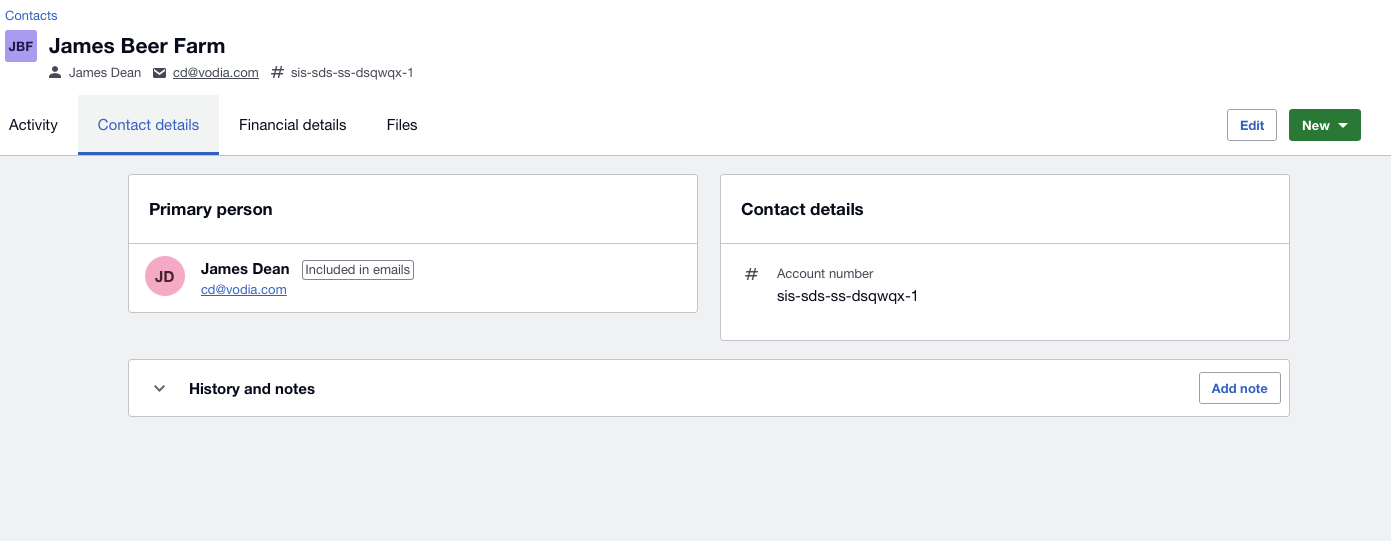
Vodia Billing's own Account reference — read from each site's PBX Billing
parameter field, parm1 by default, and inherited from there onto the
customer it bills under
— is compared against it:
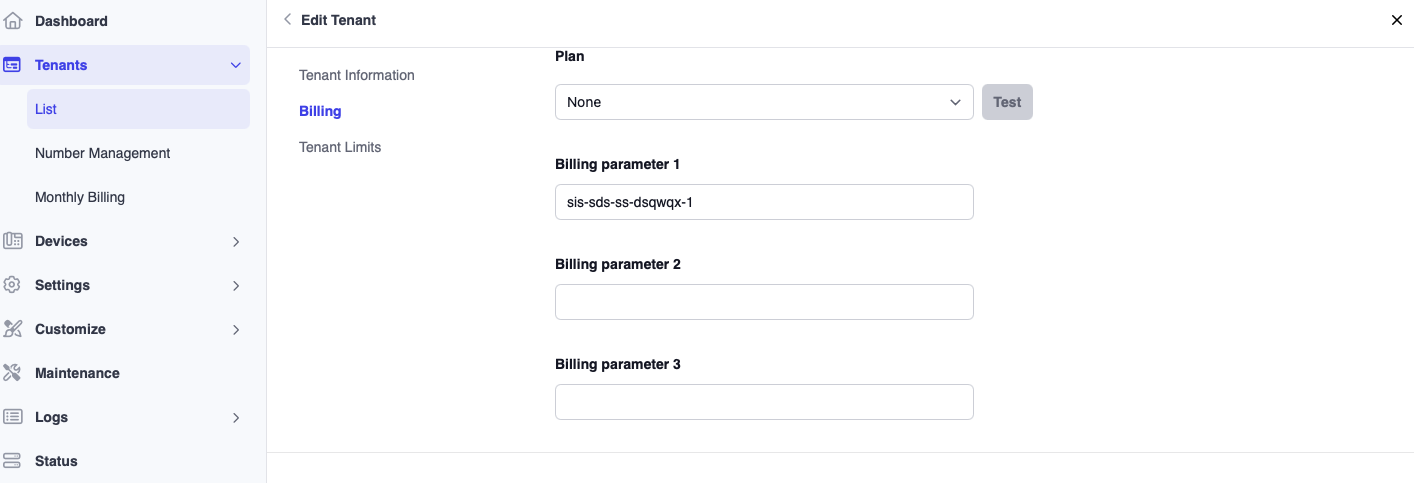
sis-sds-ss-dsqwqx-1 on both sides is an exact reference match. This is the
strongest of the three tiers auto-bind understands — an operator typed the
same string into both systems, so it is a fact rather than a guess — and it
is one of the two tiers the auto-bind pass is allowed to act on without a
human: Accounting → Mapping binds it the moment you click Auto-bind, and
the scheduled pass binds it unattended on its own interval (default four
hours, configurable under Settings).
If no reference matches, auto-bind falls back to the contact's Name against the customer's name. That is an inference rather than a fact, and it is auto-bindable on the same terms — which is why a name already claimed by another customer, or two customers proposing the same contact in the same pass, are both refused by name rather than resolved by whichever was processed first.
The binding is written to the customer, never to a site. A customer can span two PBXs, so there is no per-system answer to fall back on.
A match on domain name alone is the weakest signal and is never bound automatically, by either the button or the timer. It is only ever proposed — confirm it by hand from the mapping screen.
7. Apply a tax profile
Every Xero tenant needs a tax profile applied in Tax, because Vodia Billing is computing the tax that Xero will record.
Tax types
Xero invoice lines carry a TaxType. Vodia Billing supplies the tax type
alongside the amount it computed.
Two failure modes here produce a 0.00 tax figure with no error at all:
TaxType: "AVALARA"returns a successful response with zero tax.- GUID-shaped tax type values are Avalara-managed and cannot be used on a manual tax document.
Both look like success. Always check the tax figure on the first invoice pushed to a new Xero organisation, in Xero itself, before you send anything to a customer.
Use the tax rates that Discover pulled from your own organisation. Those are the ones that work.
Totals
For a Xero tenant, Vodia Billing's total is the invoice total. There is no separate face value to reconcile, because Xero is recording what it was given rather than computing its own figure.
The divergence detector treats Xero this way, so a mismatch on a Xero tenant is a real problem and worth investigating, unlike on QuickBooks.
One push, and no re-push button
Vodia Billing creates Xero invoices with PUT, not POST, and this is
deliberate.
Xero's POST /Invoices behaves as an upsert. Sent against an invoice number
that already exists — including one already authorised — it overwrites it
without error.
PUT is create-only. A second attempt against the same number returns a 400
rather than destroying the original.
On top of that, Vodia Billing refuses a second push locally, before any API
call, once an invoice is recorded as pushed. Between the local blocker and
PUT, a duplicate push cannot happen.
The consequence is that there is no re-push button. If a push genuinely needs redoing, the invoice must be voided in both systems and reissued.
Seeing what actually happened
The Xero developer portal has a Logs page on the app, listing every call made with its credentials: UTC timestamp, organisation, status, type, URL, method, request and response size, and duration. It is the fastest way to confirm what a push actually did.
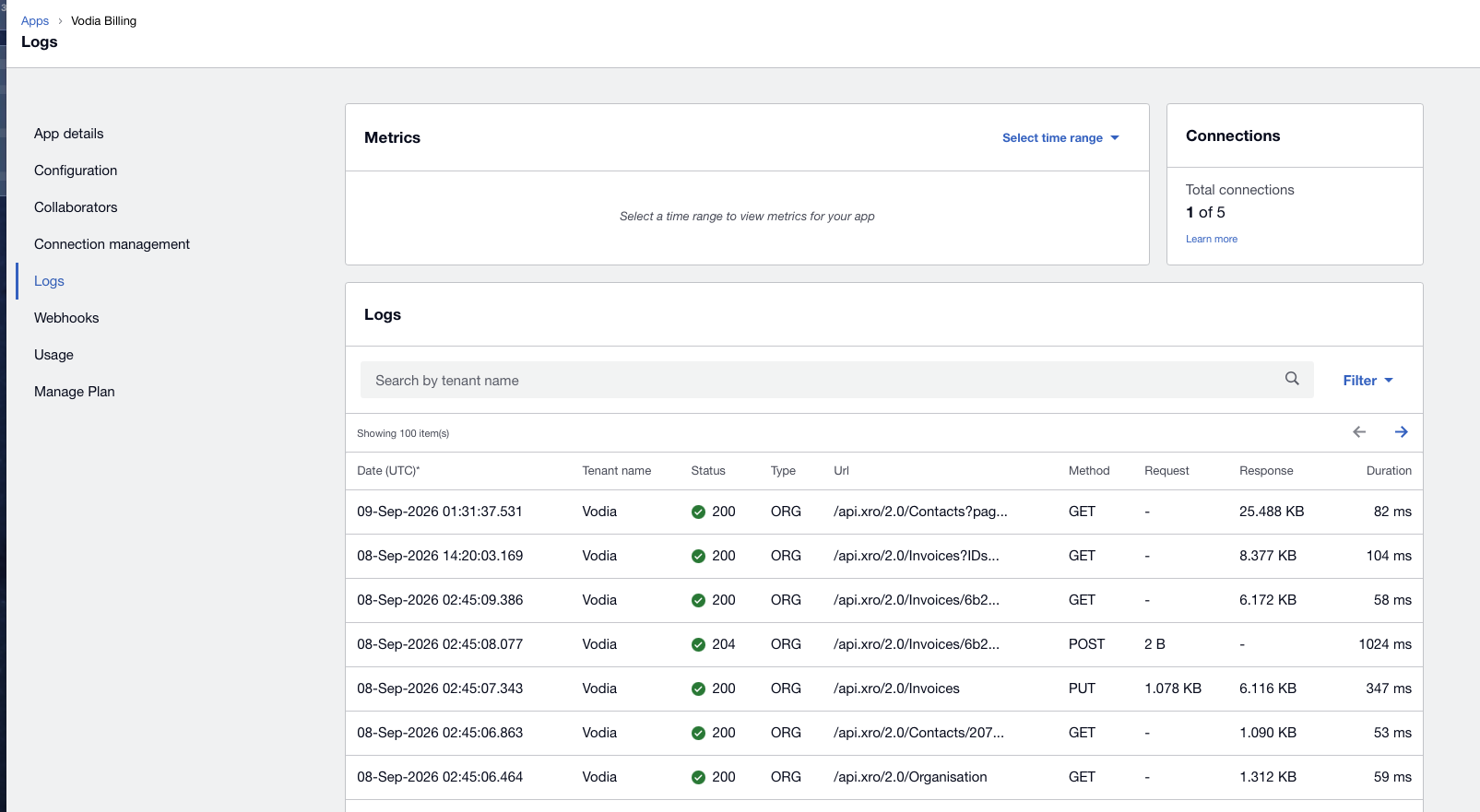
A single push, with Xero sending the email, looks like this:
GET  /api.xro/2.0/Organisation      200
GET  /api.xro/2.0/Contacts/{id}     200
PUT  /api.xro/2.0/Invoices          200
POST /api.xro/2.0/Invoices/{id}     204    <- email
GET  /api.xro/2.0/Invoices/{id}     200    <- read-back
The PUT is the create. A second attempt against the same invoice number
appears here as a 400, which is what you want to see rather than a silent
200 that overwrote something.
Payment sync appears separately as a single batched GET /Invoices?IDs=…, and
Discover as GET /Contacts?page=….
Connection cap
A Xero app supports a limited number of connected organisations. The limit and the current count are shown on the app's Configuration screen, as a connection count — read the number on your own app rather than assuming one, because only Xero can raise it.
Connection management lists each connected organisation with its Xero tenant ID, which is how you tell them apart when a partner bills from more than one.
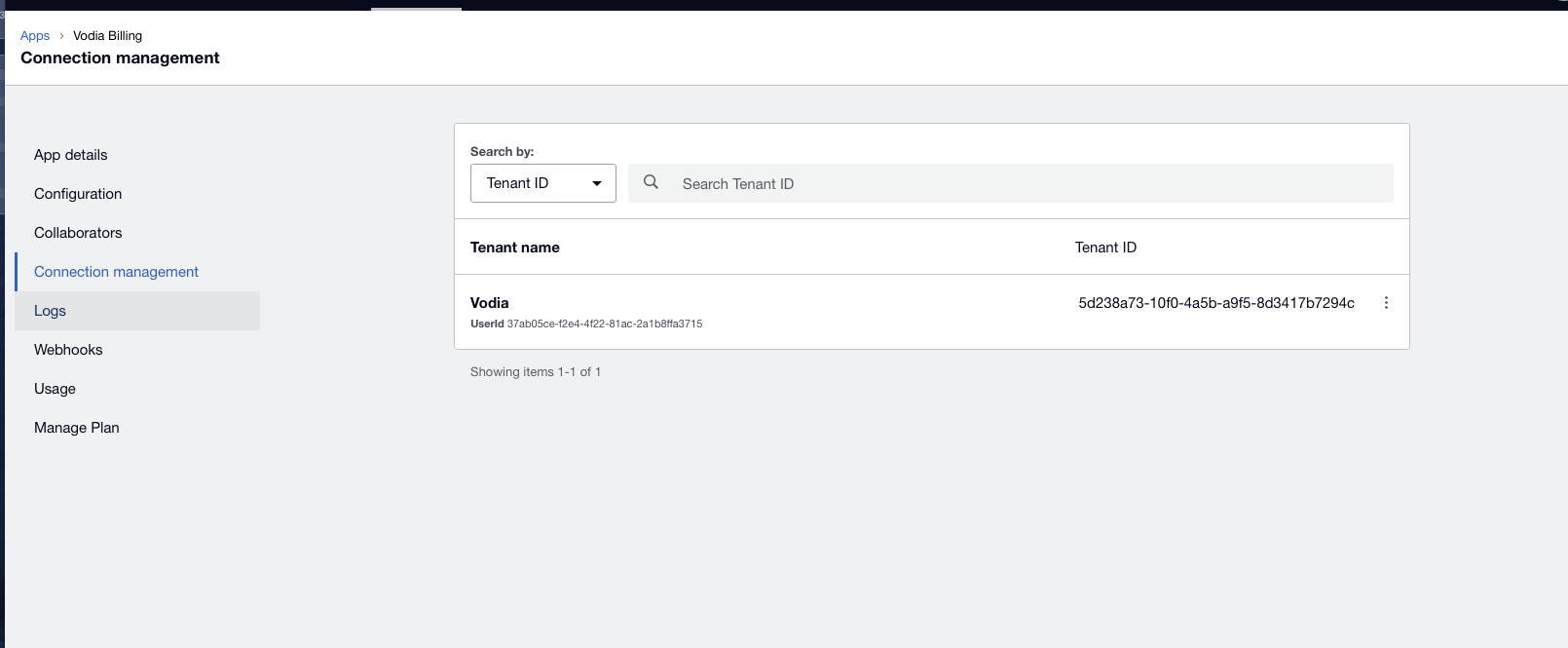
This cap is the reason each install registers its own app rather than sharing one, and it bounds the "split across multiple organisations" remedy below.
Daily API ceiling
Xero's daily limit is 1,000 calls per organisation, not 5,000. The per-minute limit is 60, with a concurrency limit of 3.
A pushed invoice costs three calls when Vodia Billing sends it
— contact read, PUT /Invoices, read-back — and four when Xero sends it,
with an additional email call. The organisation read is cached for six hours,
so it costs one call per run rather than one per invoice.
A push run therefore covers roughly 230 to 310 invoices per organisation per day, depending on which side sends. The unit is the invoice, so it is the number of customers that counts, not the number of sites: an enterprise of forty sites on one document costs the same three or four calls as a single site does.
Bill runs do not push against that estimate. Xero returns
x-daylimit-remaining on every response and the run reads it, pausing when
the count reaches a reserve of 50 calls left. A paused run records the
ceiling, the reserve, the remaining count, how many tenants are still to go,
and the resume time — Xero's counter resets at 00:00 UTC.
Nothing is marked failed. The remaining rows keep their place in the order and the next pass starts where this one stopped, because the local push blocker refuses an invoice that already carries an external ID.
If you bill more than a few hundred tenants from one Xero organisation, split the fleet across multiple runs on consecutive days, or across multiple organisations up to the connection cap on your app.
Sending the invoice
For a Xero organisation, either side can send. Configure it per customer:
- Vodia Billing sends — the customer receives the Vodia Billing invoice email, with call detail attached and a share link. Xero holds the accounting record.
- Xero sends — Xero emails its own invoice. Vodia Billing then treats the invoice as externally delivered and does not send its own copy.
Reminders follow the same setting. This is why tax authority and delivery are tracked separately: a Xero tenant has Vodia Billing computing tax while either side may be sending.
The choice also changes the API cost of a push run, as above.
Credits
Because Vodia Billing owns the tax on a Xero tenant, credits can be issued from within Vodia Billing. They apply after tax, and voiding the invoice restores them.
The corresponding credit note still has to be raised in Xero. Vodia Billing records the credit but does not create Xero credit notes.
Australian GST
The discount travels to Xero as its own negative line, so GST should be computed on the discounted base.
Verify that figure by hand in Xero on the first Australian invoice that carries a discount, before it reaches the customer. Tax is the one area where a wrong result produces an invoice that looks entirely normal.
Worked example
What arrives in Xero
The invoice from Worked Example, pushed to Xero:
Invoice INV-00151        Contact: Acme Corp
Date 2026-09-01          Due 2026-09-15         Status: AUTHORISED

  Line                        Qty      Unit    Account   TaxType     Amount
  US National              1240.00     0.012      200    OUTPUT2      14.88
  United Kingdom             86.00     0.035      200    OUTPUT2       3.01
  UK Mobile                  12.00     0.14       200    OUTPUT2       1.68
  US Toll Free              318.00     0.00       200    OUTPUT2       0.00
  Extensions                    42    12.00       200    OUTPUT2     504.00
  Hunt groups                    3     5.00       200    OUTPUT2      15.00
  DID numbers                   18     1.50       200    OUTPUT2      27.00
  Managed support plan           1   150.00       200    OUTPUT2     150.00
  Desk handset                   1    89.00       260    OUTPUT2      89.00

  Subtotal                                                           804.57
  Total Tax                                                           82.72
  TOTAL                                                              887.29
Xero's total is 887.29, the same as Vodia Billing's, because Xero is
recording the tax figures it was given rather than computing its own.
That is why a divergence alert on a Xero tenant is a real problem worth investigating, unlike on QuickBooks.
The failure that looks like success
The same push with the wrong tax type:
  Line                        Qty      Unit    Account   TaxType     Amount
  US National              1240.00     0.012      200    AVALARA      14.88
  ...
  Subtotal                                                           804.57
  Total Tax                                                            0.00   <-
  TOTAL                                                              804.57
HTTP 200. No error, no warning, no alert. An invoice that is $82.72 short, sitting in Xero as authorised.
AVALARA and GUID-shaped tax type values are Avalara-managed and cannot
carry manual tax. Use the tax rates Discover pulled from your own
organisation.
Check the tax figure on the first invoice pushed to any new Xero organisation, in Xero, before it goes to a customer.
A second push
POST /api/invoices/<id>/push
409 Conflict — invoice already pushed to Xero on 2026-09-01 03:14
Refused locally, before any API call. And if it somehow reached Xero, the
adapter uses PUT:
PUT /Invoices  (InvoiceNumber INV-00151)
400 Bad Request — invoice number already exists
POST /Invoices would have behaved as an upsert and overwritten the
authorised invoice without error. PUT is create-only. Between the local
blocker and PUT, a duplicate push cannot happen — and that is why there is
no re-push button.
Both the PUT and a refused second attempt are visible on the app's Logs
page in the developer portal.
Pacing against the daily ceiling
Push run, Xero org "Northwind Telecom"   (Xero sends the invoice)
  Ceiling:     1,000 calls/day
  Reserve:        50
  Consumed:      948
  Pushed:        236 invoices  (~4 calls each)
  Paused:         64 customers remaining — resumes after 00:00 UTC
At four calls per invoice a single Xero organisation supports roughly 235 pushed invoices per day, nearer 310 if Vodia Billing does the sending. A grouped estate gets further on the same budget, because forty sites on one document are one invoice. The run paused on the reported remaining count, not on that estimate.