QuickBooks Online
With QuickBooks Online, QuickBooks computes the tax and QuickBooks emails the invoice. Vodia Billing supplies the lines.
QuickBooks is treated as an external tax authority. That has consequences throughout, and they are all deliberate.
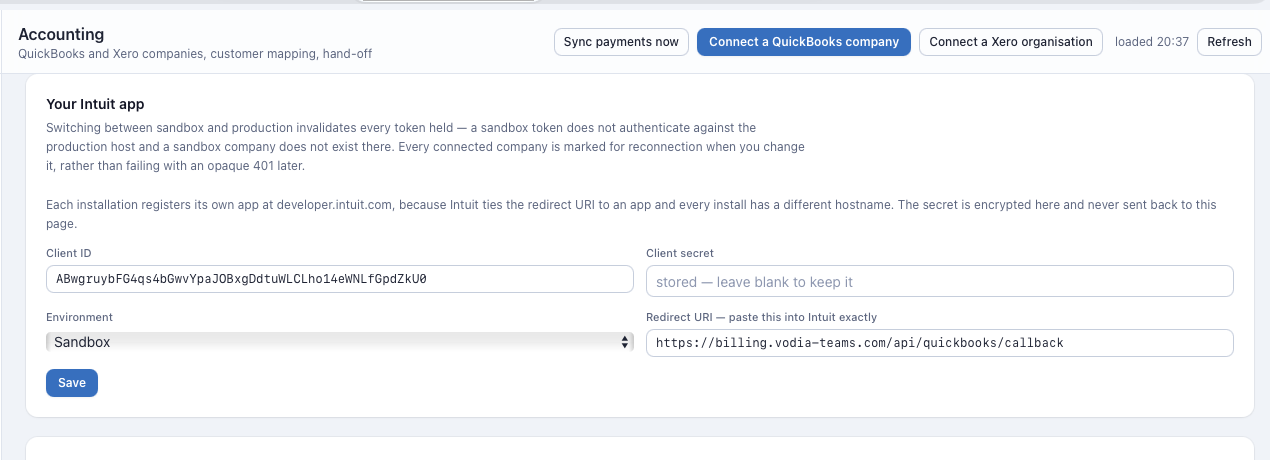
QuickBooks owns the total and emails the invoice, so it is also where the invoice is paid. A customer bound to a QuickBooks company is never offered the Stripe Pay button.
Setup
1. Register the app
In the Intuit developer portal, create an app under your workspace.
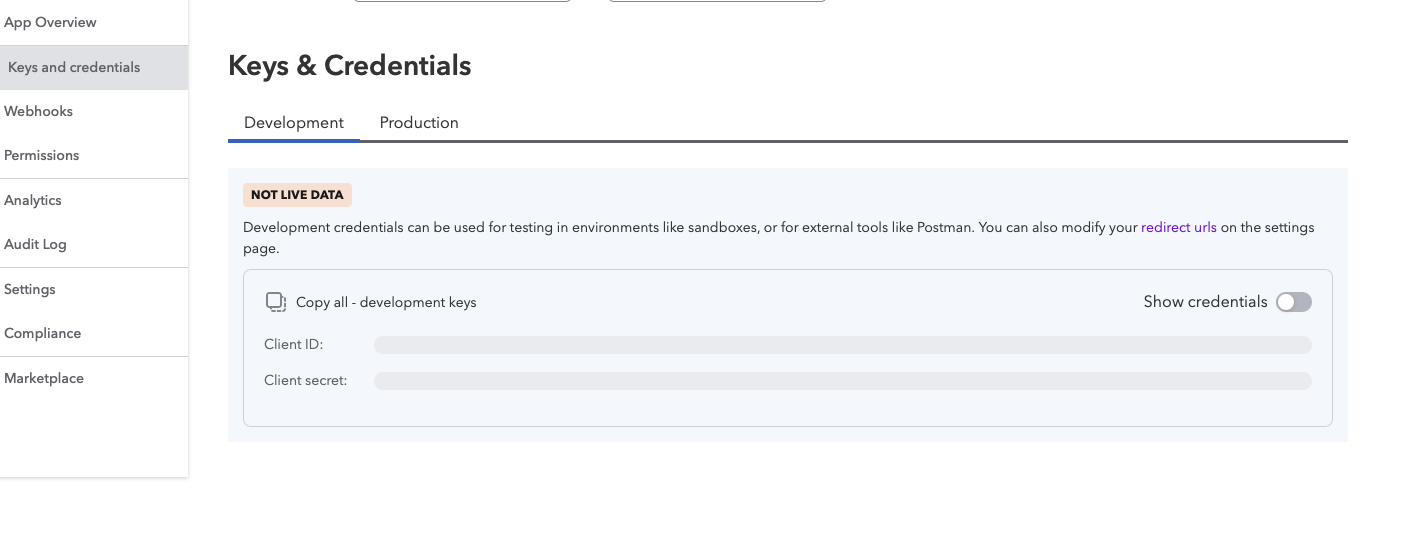
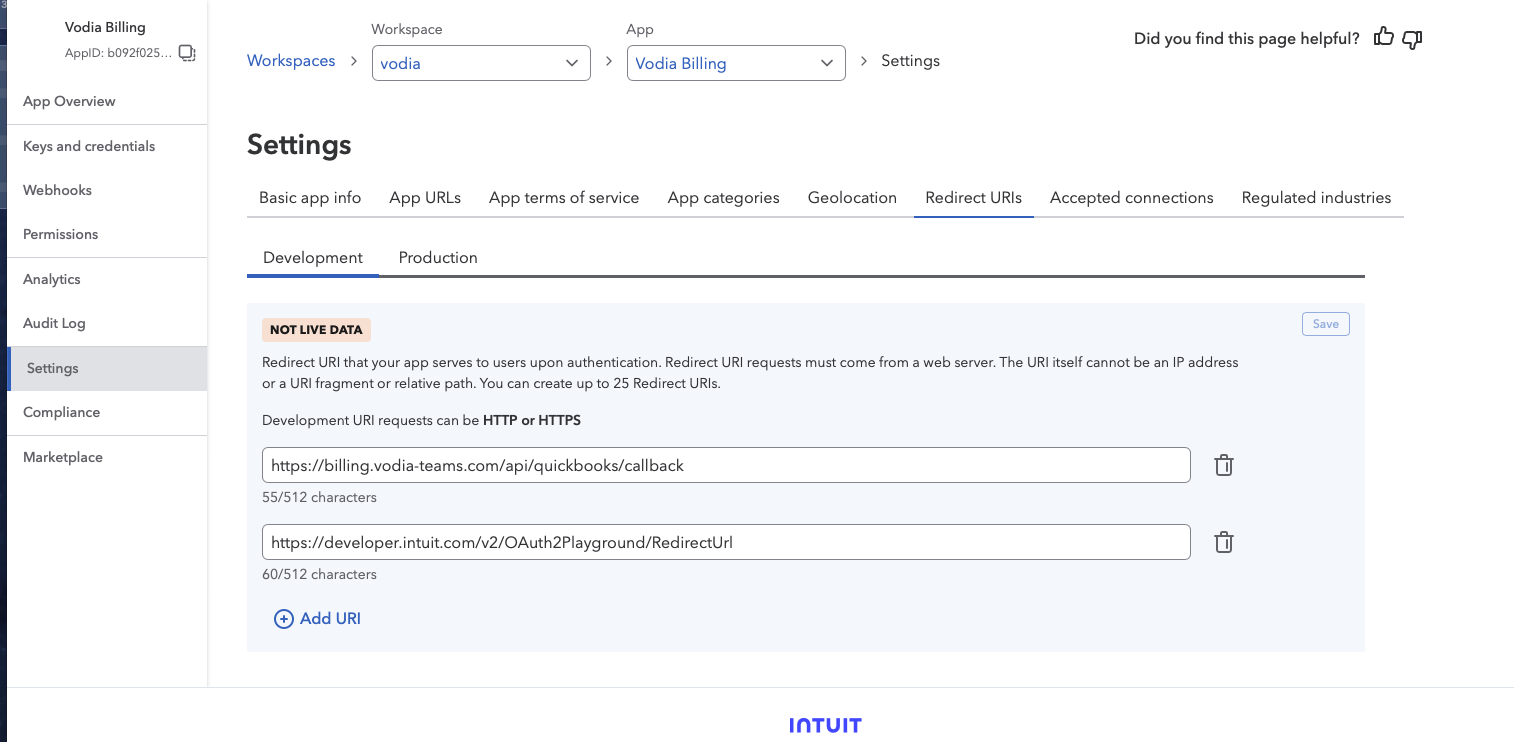
Two screens matter, and each is split into a Development and a Production tab:
Keys and credentials holds the client ID and client secret.
Settings → Redirect URIs holds the callback:
https://your-domain/api/quickbooks/callback
Under Permissions, grant the accounting scope:
com.intuit.quickbooks.accounting
The payments scope, com.intuit.quickbooks.payment, is not used and does not
need to be granted.
The redirect URI cannot be an IP address, a URI fragment or a relative path. Development URIs may be HTTP or HTTPS; a production URI must be HTTPS. Up to 25 URIs can be registered per tab.
The Development tab is labelled NOT LIVE DATA. Those credentials cannot connect to a real QuickBooks company, which is why the sandbox email limitation described below is not something a setting can work around.
Going live means doing both screens again on the Production tab: new keys and the redirect URI re-entered there. Use production credentials for a real install.
2. Enter the credentials
Accounting → App, choose QuickBooks, paste the client ID and secret.
Stored encrypted under ENCRYPTION_KEY.
3. Connect the company
Accounting → Connect. Authorise the QuickBooks company you bill from. The company name appears on the connection.
4. Discover
Discover pulls the customer list, chart of accounts and QuickBooks items.
5. Map items and accounts
QuickBooks invoice lines reference items, not bare account codes. Map:
- Usage
- Recurring
- Goods
- Discount
Vodia Billing can create the items for you from the mapping screen if they do not exist.
6. Map customers
A QuickBooks customer has no account-number field at all:
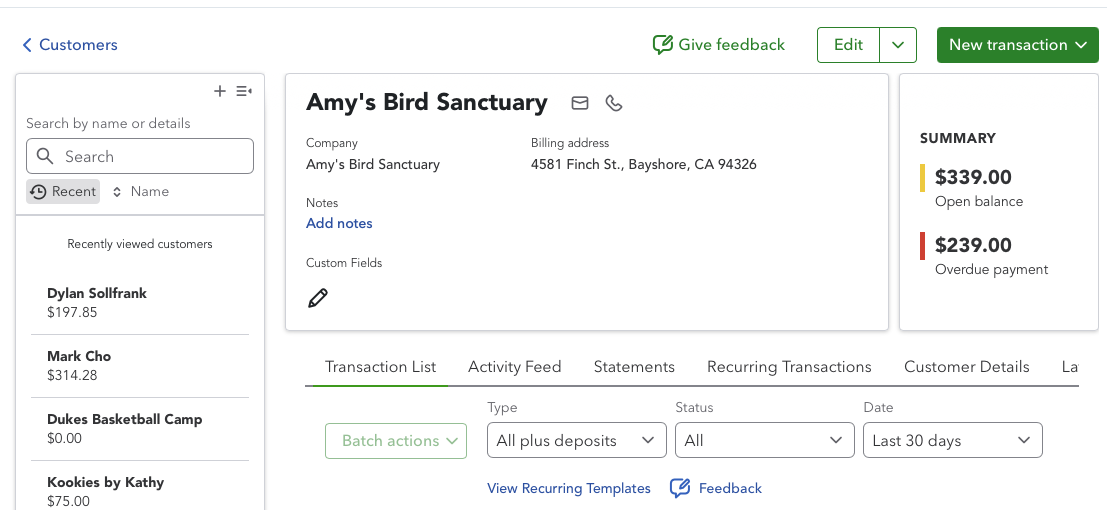
The only handle auto-bind has is the QuickBooks customer's Display Name (or Company Name), so every QuickBooks match is a name match — an inference, not a lookup. To bind a billing customer automatically, type the QuickBooks Display Name exactly into the Account reference field of its site on the PBX (Billing parameter 1 by default), from where it is inherited onto the customer:
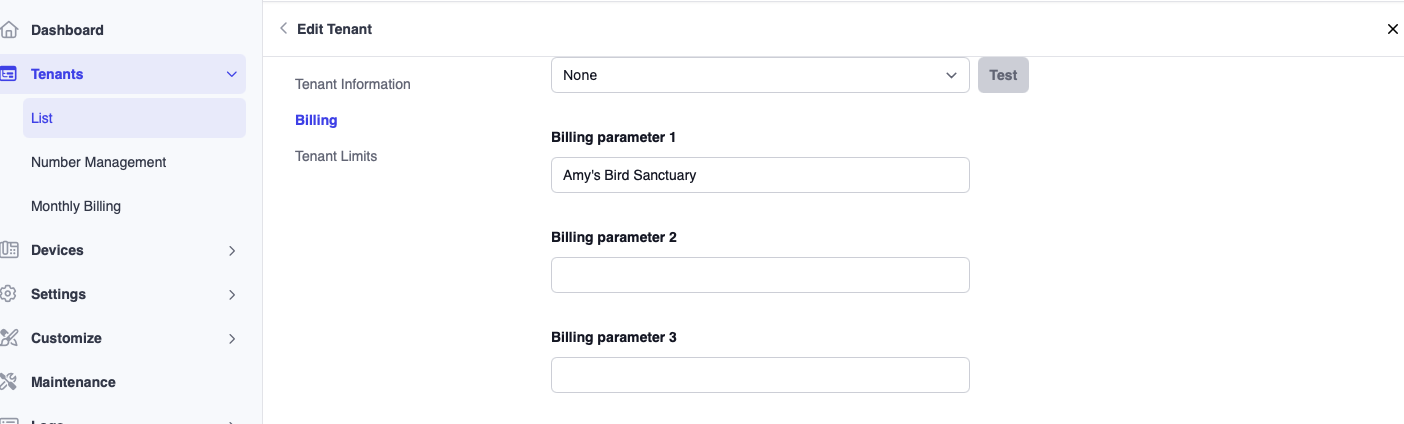
Amy's Bird Sanctuary on both sides is an exact name match. Accounting →
Mapping binds it the moment you click Auto-bind, and the scheduled pass
binds it unattended on its own interval (default four hours, configurable
under Settings) — the same rule a reference match gets on Xero, just built
from a weaker fact.
Because it is inference rather than a lookup, auto-bind still refuses rather than guesses when it matters: a QuickBooks customer already bound to another billing customer, or two billing customers proposing the same one in a single pass, are both left for a human to sort out from the mapping screen.
The binding is written to the billing customer, never to a site.
7. Do not apply a tax profile
A QuickBooks customer does not need a tax profile in Vodia Billing, because QuickBooks computes the tax. Set the customer's tax authority to the accounting package.
Totals: QuickBooks wins
Because QuickBooks computes the tax, it owns the invoice total. Vodia Billing's own total will frequently differ.
For example, the same invoice may total 199.43 in Vodia Billing and 197.85 in QuickBooks. That is not an error. QuickBooks applied its own tax rules to the lines it was given, and its figure is the one the customer sees and pays.
The QuickBooks figure is used as the authority for payment tracking, so reminders, overdue detection and paid/unpaid state all follow QuickBooks rather than the internally computed total. The divergence detector accounts for this and does not alert on an expected difference.
Vodia Billing computes and stores a tax figure on QuickBooks invoices as well. The renderer, payment tracking and export all correctly use the QuickBooks figure instead, so this stored value is unused rather than wrong. It is noted here so it is not mistaken for a live discrepancy if you look directly at the database.
Discounts
Discounts travel to QuickBooks as their own negative line, so QuickBooks computes tax on the discounted base rather than the gross. This is the correct treatment and is verified.
Sending
QuickBooks emails the invoice. Vodia Billing marks the invoice as externally delivered and does not send its own copy, so the customer receives exactly one invoice.
Reminders follow the same route: the invoice is treated as externally delivered throughout its lifecycle.
The QuickBooks sandbox reports its email state honestly as sandbox and does
not send mail. Email delivery can only be verified against a production
QuickBooks company, using production credentials.
Confirm that your first pushed invoice actually reaches the customer before relying on this route, and check the invoice's own send status in QuickBooks rather than assuming a successful push means a delivered email.
Credits
Credits cannot be raised in Vodia Billing for a QuickBooks tenant. Raise the credit note in QuickBooks instead.
The credit control is greyed out on such a tenant and the API refuses the request. This is intentional: a credit computed against a total Vodia Billing does not own would disagree with the accounting record.
Token refresh
QuickBooks refresh tokens rotate on use. Vodia Billing refreshes single-flight, coordinating through a database lock so that two simultaneous requests cannot invalidate each other's tokens.
If a connection does lapse, the accounting_disconnected and
accounting_expiring detectors raise alerts. Re-authorise from
Accounting → Connect; the customer and account mappings survive.
Push behaviour
A push is refused locally when the invoice is not finalized, has already been pushed, has a sibling already pushed for the same period, has no customer mapping, or has no due date.
Push state is per invoice, so a bill run reports pushed, blocked and failed separately and a retry touches only what failed.
Worked example
What arrives in QuickBooks
The invoice from Worked Example, pushed to QuickBooks Online. Note that no tax components are sent:
Invoice 1051             Customer: Acme Corp
Date 2026-09-01          Due 2026-09-15

  Line                     Item              Qty      Rate      Amount
  US National              Call Usage     1240.00     0.012      14.88
  United Kingdom           Call Usage       86.00     0.035       3.01
  UK Mobile                Call Usage       12.00     0.14        1.68
  US Toll Free             Call Usage      318.00     0.00        0.00
  Extensions               Recurring          42     12.00      504.00
  Hunt groups              Recurring           3      5.00       15.00
  DID numbers              Recurring          18      1.50       27.00
  Managed support plan     Recurring           1    150.00      150.00
  Desk handset             Hardware            1     89.00       89.00

  Subtotal                                                      804.57
  Sales Tax (QuickBooks computed)                                77.03
  TOTAL                                                         881.60
Vodia Billing said 887.29. QuickBooks says 881.60.
That is expected and correct. QuickBooks applied its own tax rules to the lines it was given, and it is the tax authority for this tenant. Its figure is what the customer sees, what the customer pays, and what payment tracking, reminders and overdue detection all follow.
The divergence detector accounts for this and does not alert on an expected difference.
With a discount
The discount travels as its own negative line, so QuickBooks taxes the discounted base rather than the gross:
  Line                     Item              Qty      Rate      Amount
  ... usage lines ...                                            19.57
  Usage discount 10%       Discount            1     -1.96       -1.96
  ... recurring lines ...                                       696.00
  Desk handset             Hardware            1     89.00       89.00

  Subtotal                                                      802.61
  Sales Tax (QuickBooks computed)                                76.85
  TOTAL                                                         879.46
Had the discount been applied only to the Vodia Billing total and not sent as
a line, QuickBooks would have taxed the full 804.57.
A credit attempt
POST /api/credits  { tenant: "acme-qbo.example.com", amount: 5000 }
409 Conflict — tenant tax is owned by QuickBooks Online.
               Raise the credit note in QuickBooks.
Greyed out in the interface and refused at the API. Raise it in QuickBooks, which owns the total.
Email state
Production:
INV-00151  ->  QuickBooks invoice 1051
               email_state: sent   2026-09-01 03:16   accounts@customer-example.com
               Vodia Billing did not send its own copy
Sandbox:
INV-00151  ->  QuickBooks invoice 1051
               email_state: sandbox   (QuickBooks sandbox cannot send mail)
The sandbox reports its state honestly rather than claiming success. On a production company, confirm your first pushed invoice actually reached the customer and check the send status in QuickBooks itself.
A lapsed connection
accounting_disconnected Sandbox Company US refresh token rejected high
Re-authorise under Accounting → Connect. Customer mappings, item mappings and account mappings all survive a re-authorisation.