Accounting Hand-off
Vodia Billing hands finalized invoices to Xero or QuickBooks Online. This page covers what the two have in common. The provider-specific pages are Xero and QuickBooks Online.
Two separate questions
Configuration becomes much clearer once these are kept apart:
Who computes the tax? Vodia Billing, or the accounting package.
Who emails the invoice? Vodia Billing, or the accounting package.
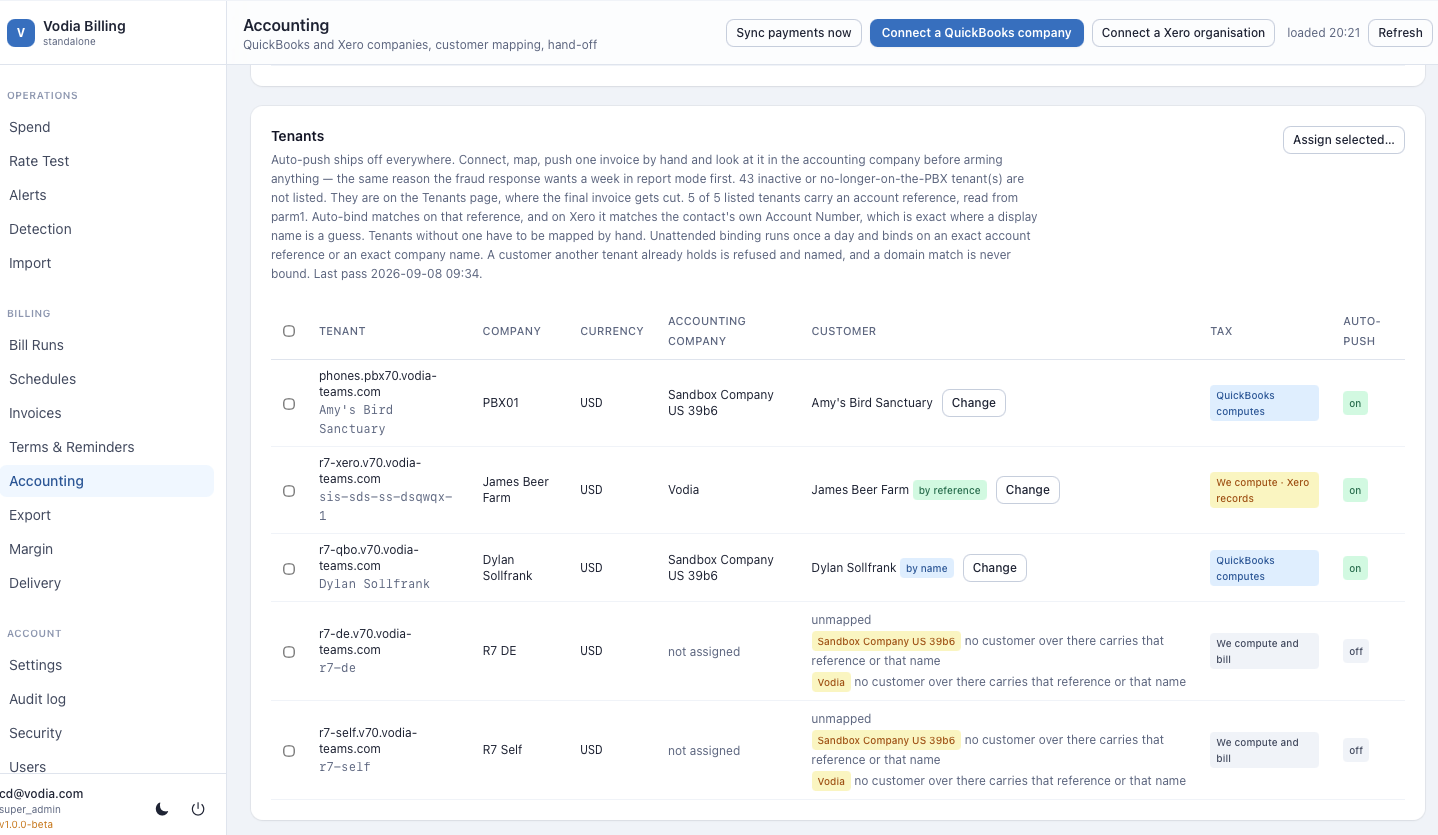
They are not the same question and Vodia Billing does not treat them as one. A Xero tenant has Vodia Billing computing tax but may have either side sending. A QuickBooks tenant has QuickBooks computing tax and QuickBooks sending. A tenant with no connection has Vodia Billing doing both.
Conflating them is the classic mistake, and it produces the specific symptom of a connected tenant being treated as self-billed for reminders and sending, or vice versa.
Registering your app
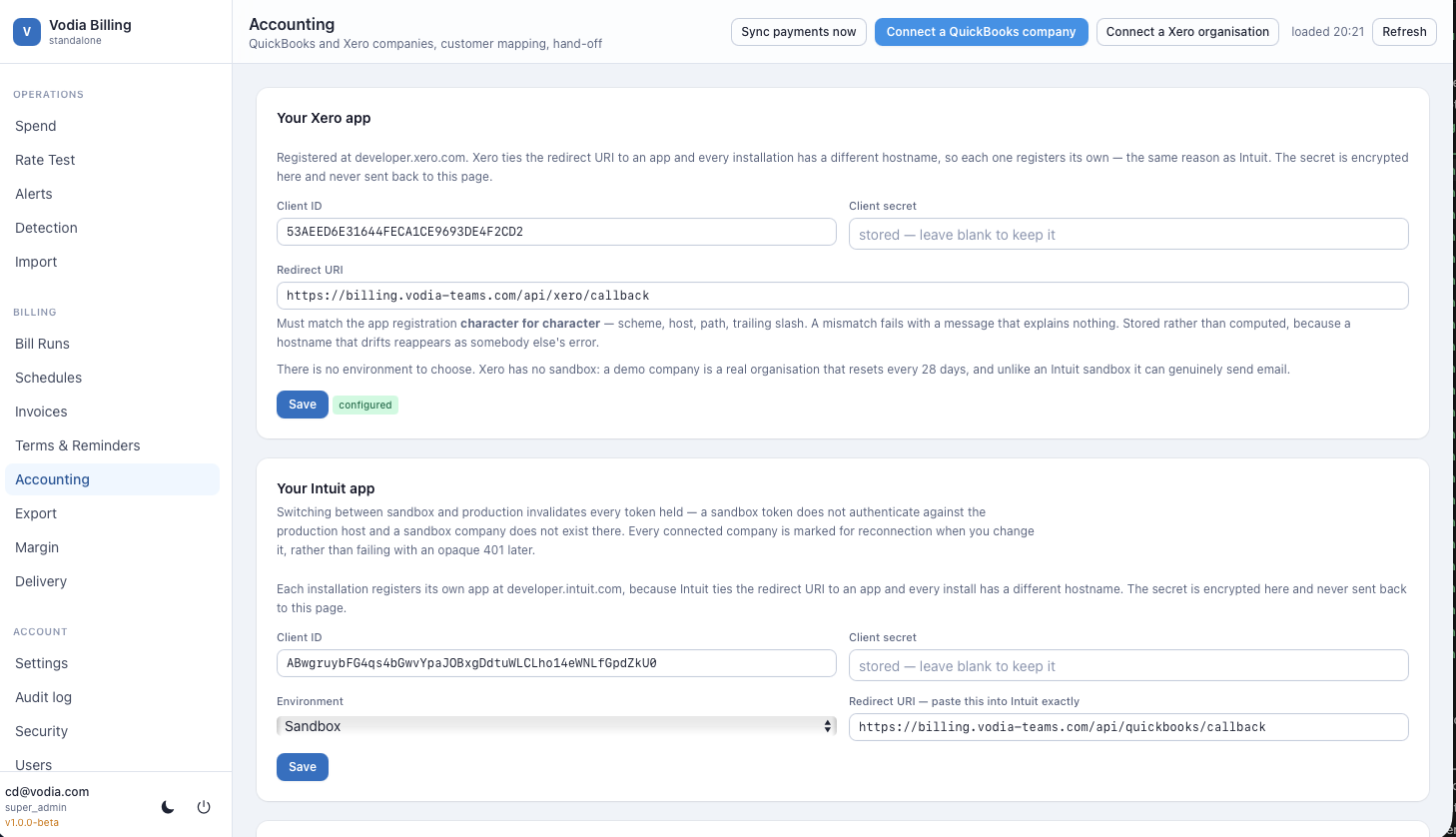
Both providers require you to register an OAuth application in their developer portal, then paste the client ID and secret into Accounting → App.
Credentials are stored encrypted under ENCRYPTION_KEY and are never returned
to the browser.
Redirect URIs to register with the provider:
| Provider | Redirect URI |
|---|---|
| QuickBooks Online | https://your-domain/api/quickbooks/callback |
| Xero | https://your-domain/api/xero/callback |
These must match exactly, including the scheme. This is one of the reasons a resolvable domain name is mandatory.
Connecting
Accounting → Connect starts the OAuth flow. You are redirected to the provider, authorise access to a specific organisation or company, and are returned here.
A connection holds an access token and a refresh token. Refresh is single-flight: concurrent requests coordinate through a database lock so two simultaneous refreshes cannot invalidate each other's tokens.
Refresh forces a token refresh. Discover pulls the customer list, chart of accounts and tax rates from the provider.
Customer mapping
Each billing customer must be mapped to a customer in the accounting package before its invoices can be pushed. Accounting → Mapping lists billing customers alongside a searchable picker.
The mapping is held on the billing customer, never on a site. A customer can span two PBXs, so there is no per-system default to fall back on, and the binding is resolved from the customer's own record only.
For an estate that has never grouped anything, every tenant is a customer of one and this reads exactly as a per-tenant mapping did.
Auto-bind proposes mappings by matching the customer's account reference and its sites' domain names against customer names and reference fields in the accounting package. Proposals are shown for confirmation, never applied automatically.
An unmapped customer is a push blocker, reported as such, and skipped rather than pushed to a guessed customer.
Account and item mapping
Invoice lines need an account code in the accounting package. Map:
- Usage — call revenue
- Recurring — seat and DID revenue
- Goods — hardware and one-time charges
- Discounts — as a negative line, so the accounting package taxes the discounted base
Mapping can be set per system and overridden per tenant. Account codes describe what a charge is, so unlike the customer binding they stay on the site.
Pushing
Push from an individual invoice, or from a bill run for the whole batch.
A push is refused locally, before any API call, when the invoice is not finalized, has already been pushed, has a sibling already pushed for the same period, has no customer mapping, or has no due date.
Push state is recorded per invoice. A run reports pushed, blocked and failed counts separately.
Payment sync
Vodia Billing polls the accounting package for payments against pushed invoices and records them, which is what stops a reminder going out for an invoice the customer already paid.
The sync interval is configurable under Settings. Payments are recorded with a reference naming the invoice.
The stored "last sync" timestamp does not distinguish "the interval has not
elapsed yet" from "the sweep failed". If it looks stale, check
docker compose logs api for the sync run rather than trusting the timestamp
alone.
Divergence alerts
The accounting_divergent detector compares the invoice total in Vodia
Billing against the total in the accounting package and raises an alert on a
mismatch.
On a QuickBooks tenant, a difference between the two totals is expected, because QuickBooks computes the tax and therefore owns the total. The comparison accounts for that; QuickBooks's figure is treated as authoritative.
Card payment and the accounting binding
A customer bound to Xero or QuickBooks Online is paid there. The invoice was pushed into their ledger; their bank feed or payment sync reconciles it. Offering the same document a second collection channel is how one payment gets recorded twice.
So card payment through Stripe is the alternative to a binding, never an addition to it. The Online payment column on this screen sits beside the binding for that reason: read on one row, "bound to Vodia" and "blocked — bound to Vodia" explain each other.
The column reports what is true — the decision, the binding and whether Stripe is set up at all, computed live. Binding a customer at ten o'clock removes their Pay button at ten o'clock. Switching a bound customer on is allowed and is stored, and the row says plainly that it is blocked and by what.
Credits on connected tenants
A credit can only be raised inside Vodia Billing when Vodia Billing owns the tax. On an external-tax tenant, raise the credit note in the accounting package instead. The credit control is greyed out and the API refuses the request, rather than producing a credit that disagrees with the package that owns the numbers.