Stripe
Card payment, for the customers you bill yourself.
A customer bound to Xero or QuickBooks Online is paid there: the invoice was pushed into their ledger, and their bank feed or payment sync reconciles it. A second collection channel against the same document is how one payment ends up recorded twice.
So Stripe is the alternative to an accounting binding, not an addition to it. A bound customer is never offered a Pay button, and the rule is evaluated live: bind a customer to Xero at ten o'clock and the button is gone at ten o'clock, not at the next sweep.
Nothing in the Xero or QuickBooks path knows that Stripe exists. A partner who does not use Stripe carries no new behaviour at all.
What you need at Stripe
One Stripe account per installation, and two things out of it.
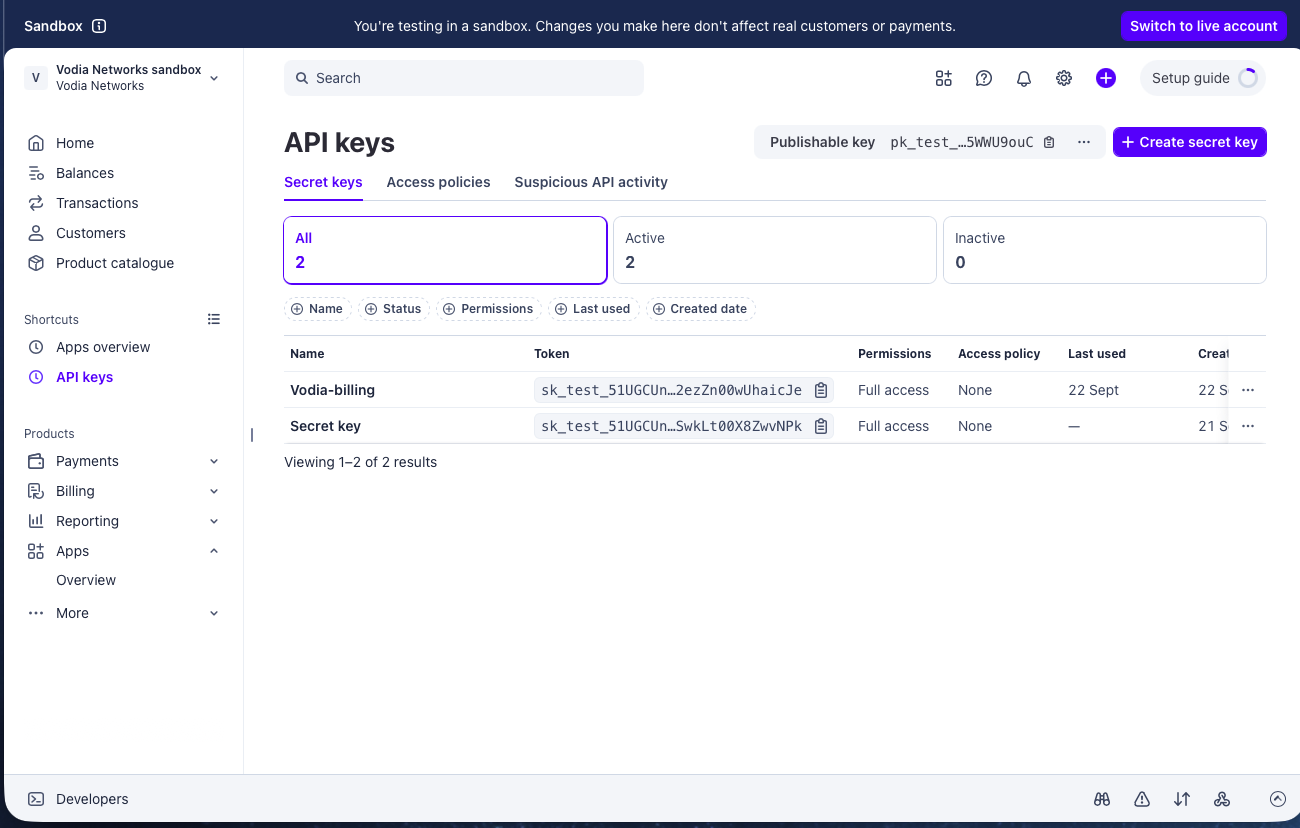
A restricted key
Create it under Developers → API keys → Create restricted key. A full
secret key (sk_live_…) works, but a restricted key cannot do anything this
system does not need — including issuing a refund by accident.
| Resource | Permission | Why |
|---|---|---|
| Checkout Sessions | Write | Minting the pay link |
| Customers | Write | One Stripe customer per billing customer, created on first use |
| PaymentIntents | Read | Reading what actually arrived |
| Charges | Read | Refund amounts |
| Disputes | Read | Dispute amounts and outcome |
| Events | Read | Diagnostics |
| Refunds | not granted | Refunds are issued in the Stripe dashboard, deliberately |
Test mode and live mode have separate keys. Which one is in use is read from
the key's own prefix (rk_test_, rk_live_, sk_test_, sk_live_) and is
never stored separately, so the badge on the screen cannot disagree with the
key underneath it.
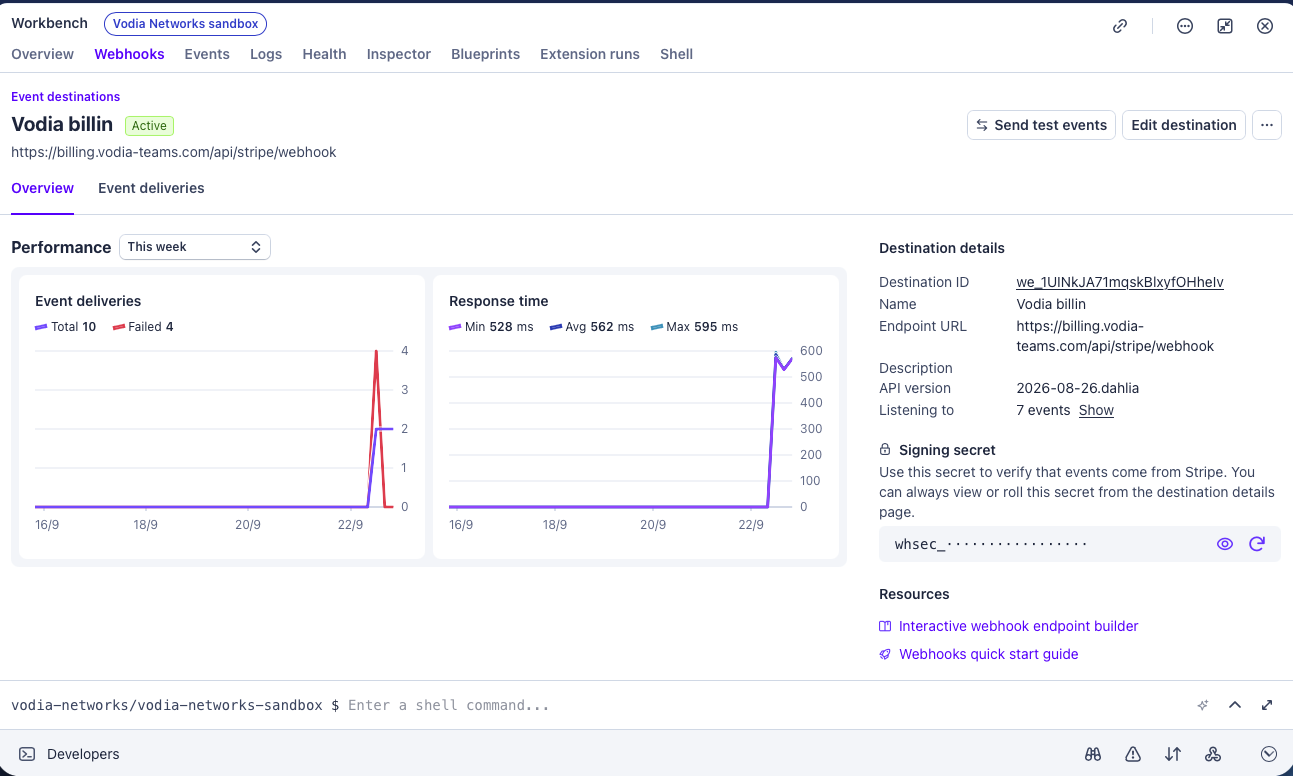
A webhook endpoint
Developers → Webhooks → Add endpoint, pointing at:
https://your-domain/api/stripe/webhook
Subscribe to these eight events:
payment_intent.succeeded
payment_intent.processing
payment_intent.payment_failed
checkout.session.completed
checkout.session.expired
charge.refunded
charge.dispute.created
charge.dispute.closed
Then copy the endpoint's signing secret (whsec_…) into Settings → Stripe.
The key can test green, the Pay button can work, and a customer can pay — and without a working endpoint none of it reaches an invoice. The money is taken, the invoice stays unpaid, and the reminder ladder chases a customer who has already paid.
There is no mode in which an unverified event writes money, so a missing or wrong signing secret means every event is refused. The Stripe pane says plainly when no event has ever arrived.
The Stripe API version is pinned to 2026-08-26.dahlia, so a partner
upgrading their own account's default cannot change what this code is sent.
Connecting
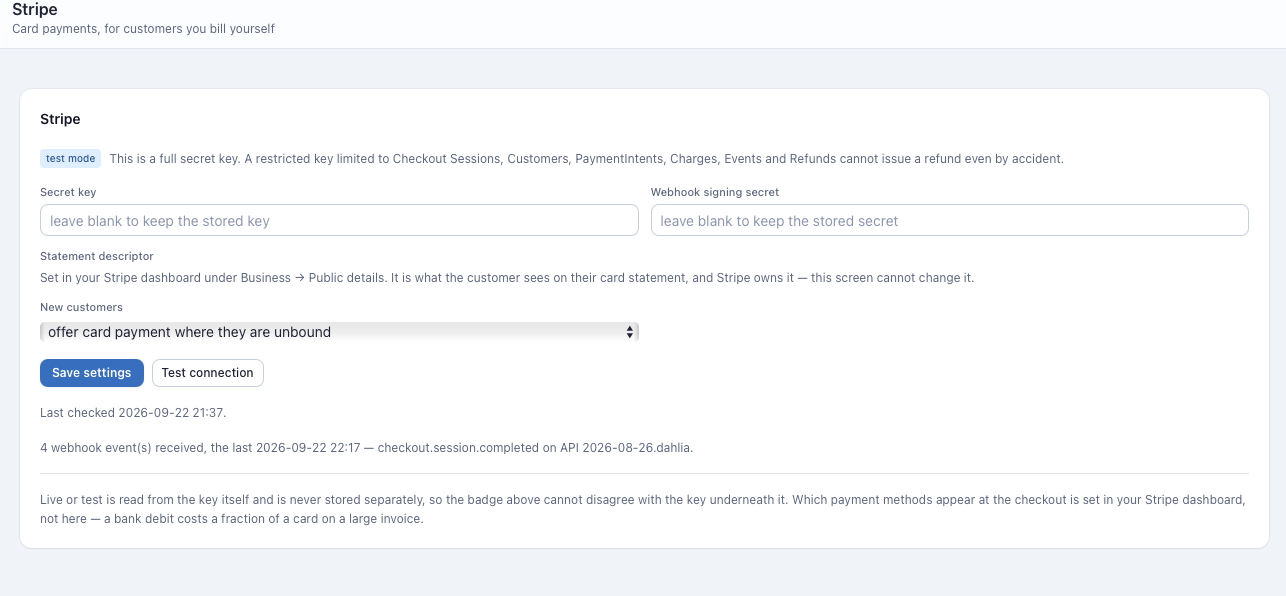
Settings → Stripe.
Paste the secret key and the webhook signing secret and save. Both are
encrypted at rest under ENCRYPTION_KEY and are never returned to the
browser; saving with a blank field keeps the stored value.
Then press Test connection. This is the only thing that arms the connection. Typing a key changes nothing: a key with a typo in it, and a restricted key missing one permission, both look perfect in the field and fail at the till. The test is a read — it fetches one customer, creates nothing and charges nothing, and is safe to press repeatedly.
Changing the key disarms the connection. The stored "working" state was earned by a successful test against the old key, and the new one has proved nothing yet.
A failed test records Stripe's own sentence and leaves it on the screen. Stripe knows things this system cannot — which permission is missing, whether the account is restricted, what its settlement currency does to a minimum — and its wording is carried through verbatim rather than replaced.
New customers
The Stripe pane also sets what happens to a customer nobody has decided about:
| Setting | Effect |
|---|---|
| do not offer card payment | The default. Nobody pays online until you say so |
| offer card payment where they are unbound | Every customer with no accounting binding can pay online |
Who may pay
Online payment is a property of the customer — the party that receives the invoice — not of a site. It is set from the Online payment column on the Accounting screen, per row with Change, or for a selection with the Online payment… bulk action.
That column lives on the accounting table on purpose. The rule it reports is a rule about the two of them together: read on one row, "bound to Vodia" and "blocked — bound to Vodia" explain each other. Read on two screens they are two unrelated facts.
The setting is three-valued:
| Value | Meaning |
|---|---|
on | Offer card payment to this customer |
off | Never offer it |
inherit | Nobody has decided; the installation default applies |
inherit is answered from the installation default at every read. Change the
default and every inherited customer changes with it, immediately. Nothing
sweeps the setting into customer records, so a decision you made by hand is
never quietly overwritten by a later pass.
The badge reports the effect, the button sets the intent, and they are different questions. Switching a bound customer on is allowed and is stored — it simply cannot take effect while the binding stands, and the row says so with the company named.
Why a customer is blocked
| Sentence on the row | What to do |
|---|---|
| Stripe is not set up on this installation | Settings → Stripe, then Test connection |
| this customer is bound to Company, and an invoice that is pushed there is paid there | Nothing. This is the rule |
| online payment is switched off for this customer | Change the row to on |
The Pay button
It appears on the invoice share page, the link your customer already receives in the invoice email and in every reminder. There is no separate payment URL: the pay route rides the same share token, which is already revocable and already audited.
Eligibility is asked on every page load, so a button that would not work is never drawn, and a customer who follows an old link gets a readable page saying why rather than an error.
A refusal names its reason:
| Sentence | Why |
|---|---|
| only a final invoice can be paid online | Drafts and voided invoices have no amount to collect |
| the tax on this invoice was computed by an accounting package, so what is owed is their figure and it is collected there | An external-tax invoice. Our figure is a subtotal; charging it would undercharge by exactly the tax |
| there is nothing outstanding on this invoice | Already settled, or settled by a credit or a recorded payment |
| n is below the m minimum Stripe accepts | See the limits below |
| n is above the m ceiling — an invoice this size has to be settled by bank transfer | See the limits below |
The invoice email itself carries no button. It carries the share link, and the button is on the page behind it. An emailed invoice never contains script of any kind, which is a guarantee worth more than a button in a letter.
What is charged
What is still outstanding, not the face of the document. A credit applied or a cheque recorded since finalization has already moved that number, and the session is minted at the moment of the click so it asks for what is owed now.
The charge equals the invoice, exactly. Stripe Tax and Managed Payments are both switched off on every session, because the invoice total already carries the sales tax, the USF, the PUC and the 911 fee — computed at rating time, frozen at finalize, and printed on a document the customer holds. Stripe computing its own tax on top would charge more than the invoice says.
Those flags are sent per session rather than set once in your Stripe dashboard, so a correct charge never depends on somebody remembering a setting in a screen this system does not control.
A Checkout session lives for one hour. Nothing needs cleaning up if the customer abandons it, and binding them to an accounting company in the meantime does not leave a live public payment URL behind.
Limits
Stripe will not charge an arbitrarily small or large amount, and the check happens here — before the click — rather than as an error after it.
| Currency | Minimum | Currency | Minimum |
|---|---|---|---|
| USD, AUD, EUR, NZD, CAD, CHF, SGD | 0.50 | PHP, INR, ZAR | 0.50 |
| GBP | 0.30 | AED, MYR | 2.00 |
| JPY | 50 | HKD | 4.00 |
The ceiling is 99,999,999 minor units (999,999,999 for INR). That is the limit for non-card payment methods rather than the twelve digits cards allow, because the customer chooses the method at checkout and we do not. A million-dollar invoice settling by bank transfer instead is not a hardship.
Stripe applies its minimum to the settlement currency. An Australian account billing a USD invoice must clear the AUD minimum after a conversion at a rate this system does not have. The check here catches the twenty-cent invoice before anybody clicks; the cross-currency case is caught by Stripe, whose sentence is shown on the refusal page verbatim.
The published minimums were read off Stripe's documentation in September 2026. They are not part of any API and can move.
Only the fifteen currencies the tenant dropdown offers can be charged. JPY is the one with no decimal places, and a JPY invoice carrying a fraction of a yen is refused rather than rounded — rounding would collect an amount that differs from the frozen invoice, and the invoice would then read part-paid or overpaid for ever with nothing saying why.
The Stripe customer
One billing customer is one customer at Stripe, however many sites it covers. Eleven branches on two PBXs are one party here, one invoice, and one Stripe customer.
It is created lazily, on the first payment attempt, not swept ahead of time. Its name is the customer's name, its email is the first billing recipient, and it carries metadata naming this installation and the billing customer id, so a row in your Stripe dashboard can be traced back here.
Three separate guards stop it ever being created twice: the stored id, an idempotency key covering the moment between Stripe answering and the record being written, and a metadata search covering a rebuilt database. If two Stripe customers already claim one party, the payment is refused and says so — choosing one of them would be a coin toss whose loser's payments land against somebody else's invoices.
The mode that minted the customer is stored beside its id. Swapping a test key for a live one is therefore reported by name, rather than becoming a 404 on somebody's payment page.
After the payment
One event writes money, and it is not the obvious one.
checkout.session.completed fires when the customer finishes at checkout. For
a card that means the money is taken. For ACH, SEPA, BACS or BECS it means the
debit has been requested: the payment is still processing and can fail days
later on insufficient funds. So the ledger row is written on
payment_intent.succeeded and on nothing else. Everything else is an audit
line or an alert.
That means a card payment settles an invoice in seconds and a bank debit settles it days later, through exactly the same code path.
The row records the amount that actually arrived, the method (card or direct debit, with the Stripe method kept in the label), and the PaymentIntent id. The invoice reads PAID because the ledger says so — the same derivation that has always driven the share page, the reminder ladder, the ageing and the bill run.
Four guards stand between the endpoint and a wrong row:
- The signature, checked in constant time against the raw bytes, inside a five-minute window so a captured event cannot be replayed for ever.
livemode, compared against the mode of the stored key. A test card can never settle a real invoice.- The event id, unique in the database. Stripe retries for three days and a duplicate is a no-op.
- The PaymentIntent id, unique in the payment ledger. One payment cannot produce two rows even if a future change dispatches the same money twice.
Refunds and disputes
Refund in the Stripe dashboard. The reversal arrives here as its own row.
A refund is a reversing entry, not a credit and not a deletion. A credit reduces what a customer owes; a refund restores it, because the money went back and the invoice is unpaid again. Deleting the original payment would be the other wrong answer: the payment happened, it is on the customer's statement, and money never leaves a balance in this system without a record of who removed it.
That is correct when the refund corrects an overcharge on a document that will be reissued. It is wrong when the refund was a goodwill gesture — in that case the invoice needs a credit note, or the reminder ladder will chase money you gave back. The system raises an alert saying exactly this, with the new outstanding figure in it.
The amount is computed as a difference against what has already been booked, so a replayed event writes nothing, a second partial refund books only the difference, and a refund that fails at Stripe restores the payment.
A dispute writes nothing until it closes. The funds are withheld immediately, but what the customer owes is contested rather than unpaid, and a reversal at that moment would set the reminder ladder chasing somebody in the middle of disputing — which is both wrong and the fastest way to lose the dispute. A lost dispute is a reversal; a won one is a line in the audit trail.
A Stripe row — payment or reversal — cannot be unapplied by hand. The API refuses it, because deleting a payment claims the customer never paid while their statement says they did, and deleting a reversal claims we hold money that is demonstrably back with them.
Alerts
Seven rules, raised by the webhook rather than by the daily detector sweep. They exist for one class of thing only: money moved and the ledger did not.
| Rule | Fires when |
|---|---|
stripe_webhook_rejected | An event failed signature verification. Until it is fixed, no payment is recorded |
stripe_mode_mismatch | A live event arrived against a test key, or the reverse. It was ignored, so any money it carried is unrecorded |
stripe_payment_unattributed | A payment arrived naming no invoice |
stripe_payment_unknown_invoice | A payment named an invoice that does not exist here |
stripe_refund_unmatched | A refund or closed dispute has no payment recorded here to reverse |
stripe_refund_recorded | A refund was booked. Says what the invoice now owes, so a goodwill refund gets a credit note instead of a chase |
stripe_dispute | A dispute was opened, or lost |
A declined card is not an alert. It is an audit line: the customer knows, they will try again, and an alert per failed attempt teaches an operator to stop reading the page — which is how the one that matters gets missed.
Repeats escalate an existing row rather than raising a second one, so a wrong signing secret produces one alert with a rising count.
What Stripe owns and this screen does not
- Which payment methods appear at checkout — cards, bank debits, wallets — is set in your Stripe dashboard. A bank debit costs a fraction of a card on a large invoice, so it is worth enabling.
- The statement descriptor, the name on the customer's card statement, comes from your Stripe account's public details. There is deliberately no control for it here: a second place for one answer to live is a second place for it to be wrong.
- Refunds, as above.
Worked examples
A card payment, start to finish
2026-09-16 10:41  customer opens the share link for INV-00151
                    outstanding 887.29 USD
                    Pay button drawn — unbound customer, Stripe armed

2026-09-16 10:41  Pay clicked
                    Stripe customer cus_… reused (created 2026-08-02)
                    Checkout session created, 88729 USD minor units
                    automatic_tax off, managed payments off
                    expires 11:41

2026-09-16 10:43  checkout.session.completed      audit line only
2026-09-16 10:43  payment_intent.succeeded        LEDGER ROW
                    887.29 card  ref pi_…  source stripe

2026-09-16 10:43  INV-00151 reads PAID
                    remaining reminders cancelled
The charge equals the invoice to the cent, because the total already carried its tax and nothing was allowed to add more.
A bank debit, which is not paid on the day it is started
2026-09-16 10:43  checkout.session.completed      audit line only
2026-09-16 10:43  payment_intent.processing       audit line only
                    the invoice is still UNPAID — the debit is requested,
                    not settled

2026-09-19 04:12  payment_intent.succeeded        LEDGER ROW
                    887.29 direct_debit (us_bank_account)
                    INV-00151 reads PAID
Nothing is written on completion, so nothing has to be taken away if the debit fails. A failed debit is an audit line against an invoice that was never marked paid in the first place.
A partial refund
2026-09-20  refunded 100.00 in the Stripe dashboard

            charge.refunded            amount_refunded 10000
            LEDGER ROW  -100.00  reversal  ref re_…

            INV-00151:  887.29 paid, 100.00 refunded
                        100.00 outstanding, state part_paid

            ALERT stripe_refund_recorded (medium)
              100.00 USD refunded on invoice 151, which is now 100.00 USD
              outstanding. If that refund was goodwill the invoice needs a
              credit note, not a chase.
Refund another 50.00 the next day and the second event carries a cumulative 150.00; the row written is the 50.00 difference, not another 150.00. Replay either event and nothing is written at all.
A customer bound to Xero, asked to pay online
Accounting → Online payment → Acme Corp → on

  set: on
  warning: this customer is bound to Vodia, and an invoice that is
           pushed there is paid there

Row reads:  [blocked]  this customer is bound to Vodia
Share page: no Pay button
The intent is stored rather than refused — otherwise the same flag would mean different things depending on when it was set. It simply cannot take effect while the binding stands. Unbind the customer and the button appears on the next page load, with no other action.