Fraud and Alerts
Toll fraud is the fastest way for a reseller to lose money on a PBX fleet. A compromised extension dialling premium international destinations overnight can run up thousands before anybody notices in the morning.
Vodia Billing runs twenty detectors, on a daily sweep and on demand, with an additional fast path that evaluates high-risk bursts at ingest rather than waiting for the sweep.
Alerts
Alerts lists what fired. Two kinds:
Standing alerts describe a condition that is still true: a disconnected accounting connection, an overdue invoice, a duplicate invoice period. These coalesce, tracking first seen and last seen, and clear when the condition resolves.
Event alerts describe something that happened: a high-risk call, a burst, a spend spike. These accumulate hits.
Alerts can be acknowledged. Acknowledgement is per rule and per tenant.
Detectors
Fraud and usage
| Rule | Fires when |
|---|---|
high_risk_call | A call to a destination marked high-risk in the rate sheet |
high_risk_out_of_hours | A high-risk call inside the out-of-hours window |
high_risk_burst | N high-risk calls from one extension within M minutes |
high_risk_spend | High-risk spend for a tenant crosses a threshold |
extension_velocity | Call count from one extension exceeds a rate |
spend_spike | Spend in a window exceeds the baseline by a factor |
new_expensive_destination | First call to a destination above a per-minute price |
new_class_destination | First call to a destination class never seen for this tenant |
usage_silent | A tenant that normally has traffic has gone quiet |
inclusion_allowance | A tenant crosses its inclusion allowance threshold |
Billing and accounting
| Rule | Fires when |
|---|---|
invoice_overdue | Past due beyond the grace period |
invoice_overdue_unsent | Past due and never sent |
invoice_period_duplicate | Two invoices exist for the same tenant and period |
charge_exported_unbilled | Charges exported but never invoiced |
accounting_disconnected | An accounting connection has lost its tokens |
accounting_expiring | Tokens are close to expiry |
accounting_push_failed | A push to the accounting package failed |
accounting_divergent | Invoice totals disagree beyond the expected tolerance |
accounting_not_emailed | An externally-delivered invoice was never emailed |
accounting_payment_drift | Recorded payments and the package disagree |
detector_failed | A detector itself errored, so its silence is not a clean result |
detector_failed exists so that a detector crashing is loud. A detector that
fails silently looks exactly like a detector finding nothing.
Card payments
These seven are raised by the Stripe webhook rather than by the daily sweep, so they are not detectors and are not affected by Detection thresholds. They exist for one class of thing: money moved and the ledger did not.
| Rule | Fires when |
|---|---|
stripe_webhook_rejected | An event failed signature verification. Until it is fixed no payment is recorded against any invoice |
stripe_mode_mismatch | A live event arrived against a test key, or the reverse. It was ignored, so any money it carried is unrecorded |
stripe_payment_unattributed | A payment arrived naming no invoice |
stripe_payment_unknown_invoice | A payment named an invoice that does not exist here |
stripe_refund_unmatched | A refund or a closed dispute has no payment recorded here to reverse |
stripe_refund_recorded | A refund was booked, and the invoice is chaseable again. Says what it now owes |
stripe_dispute | A dispute was opened, or lost |
A declined card is deliberately not an alert. It is an audit line: the customer knows, they will try again, and an alert per failed attempt teaches an operator to stop reading the page.
Detection settings
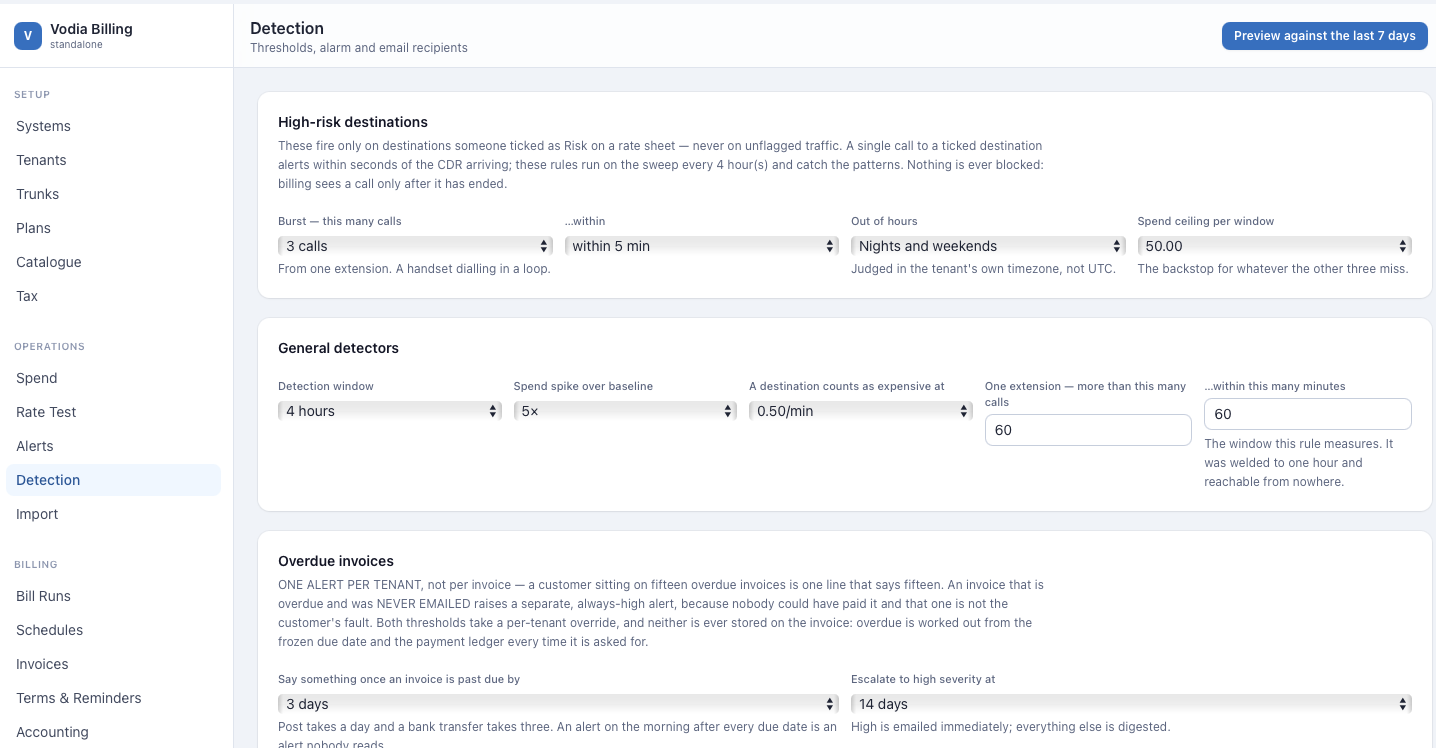
Detection holds the thresholds. Defaults:
| Setting | Default | Meaning |
|---|---|---|
windowHours | 4 | Spend spike comparison window |
spikeFactor | 5 | Multiple of baseline that counts as a spike |
expensiveMicroPerMin | 0.50 | Per-minute price above which a destination is "expensive" |
velocityPerHour | 60 | Calls per extension |
velocityMinutes | 60 | Window for the above |
silenceHours | 48 | Quiet hours before usage_silent |
overdueGraceDays | 3 | Days past due before alerting |
overdueEscalateDays | 14 | Days past due before medium becomes high |
riskBurst | 5 | High-risk calls that constitute a burst |
riskBurstMinutes | 10 | Burst window |
riskSpendMicro | 50.00 | High-risk spend threshold |
riskHours | nights_weekends | Out-of-hours mode |
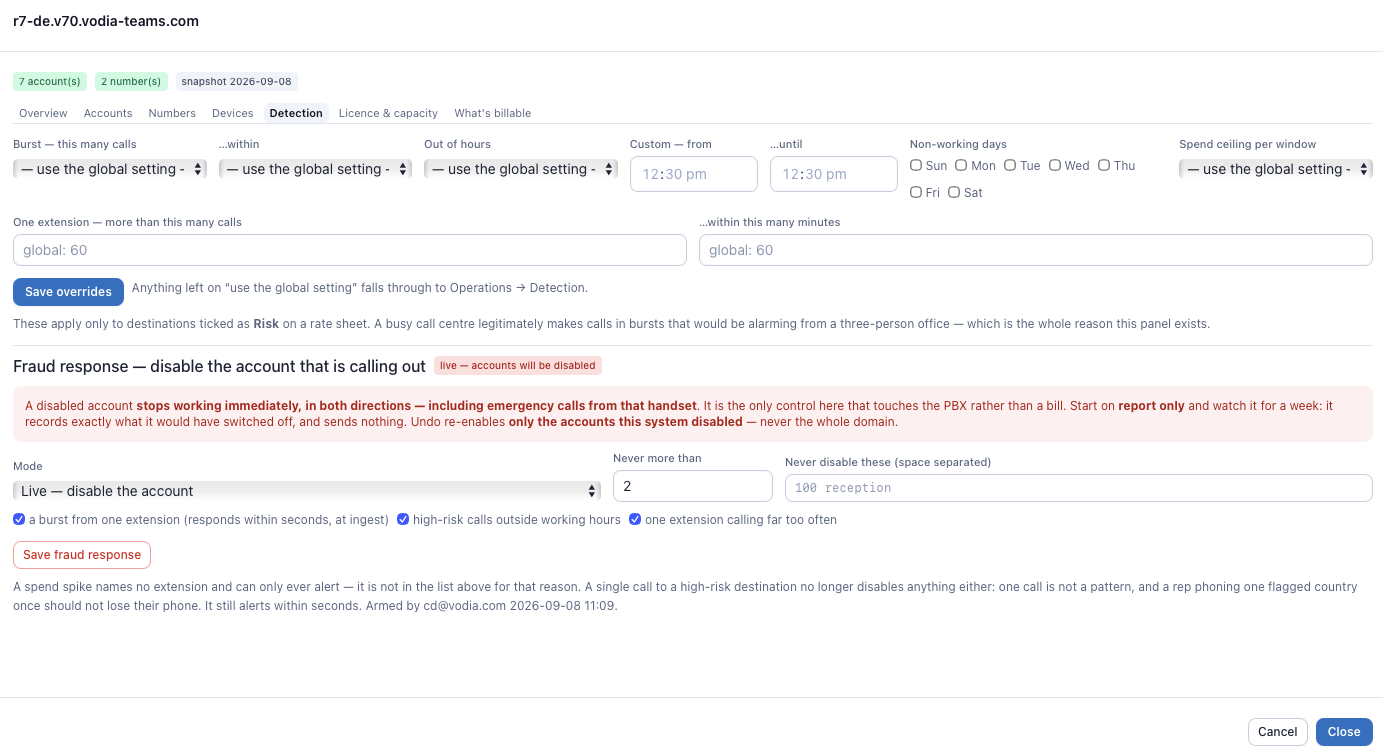
Any threshold can be overridden per tenant. The override is read before the global on both the sweep and the ingest fast path, so a threshold means the same thing on both.
Setting a threshold to zero disables that rule.
Out-of-hours windows
Four modes: off, nights (22:00–06:00), nights_weekends (the same window
plus non-working days), and custom.
custom takes a start and end time in minutes from local midnight, and a list
of non-working days. An end at or before the start wraps, so 22:00–06:00
is expressed naturally.
Non-working days are chosen, not assumed. Saturday and Sunday is wrong in the Gulf, where the weekend is Friday and Saturday, and this system bills worldwide.
Windows are evaluated in the tenant's timezone.
Recipients
Detection also holds the email addresses that alarm mail is sent to. Alarm mail requires SMTP to be configured under Settings.
Preview
Detectors can be run as a dry run: evaluated and reported, writing nothing and mailing nothing. The dry run executes the same code as the real sweep deliberately, because a preview with its own logic would report on a detector you do not actually run.
Automatic response
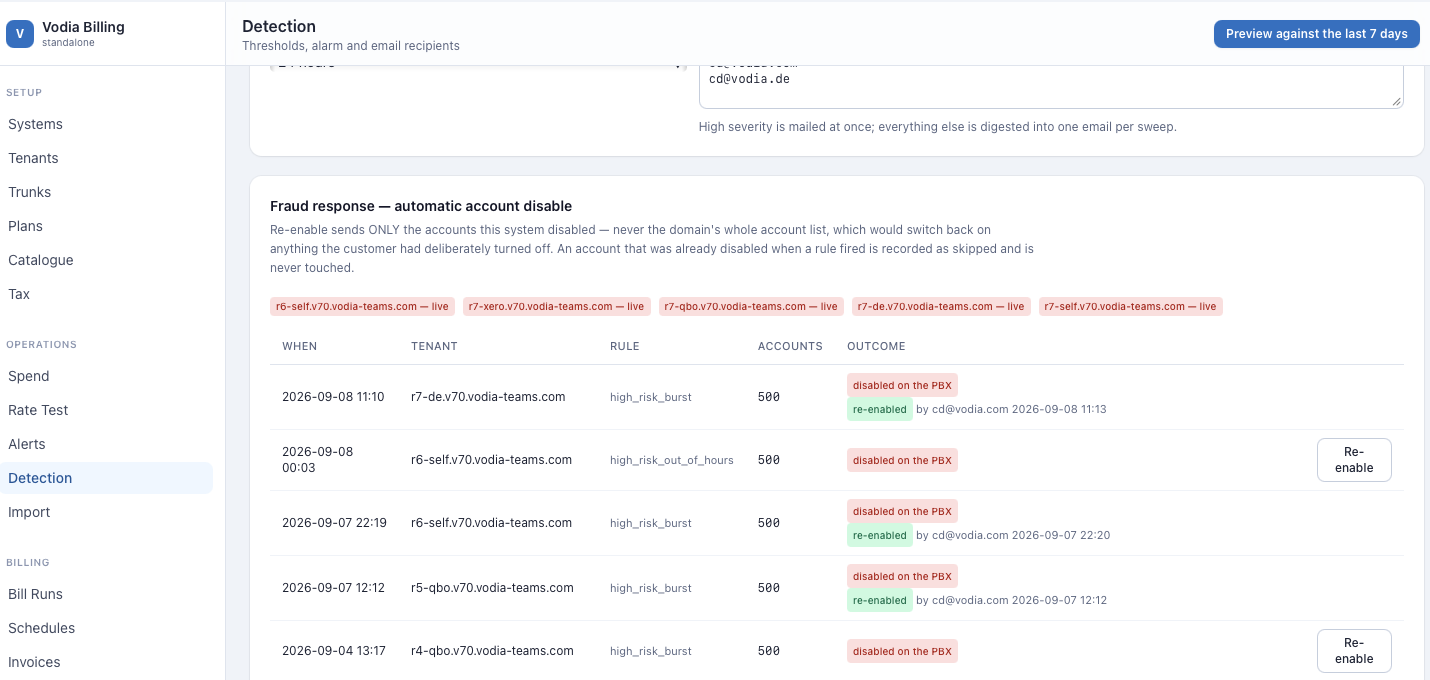
A tenant can be armed to respond automatically to a fraud alert by disabling the offending extension on the PBX.
Two modes:
- Report — raise the alert only. The safe mode, and the default.
- Disable — disable the extension on the PBX via its API.
A tenant that is live-armed shows a red badge on its row, because an armed automatic response is a configuration you should never discover by accident.
Every action taken is recorded, and actions can be undone. A refusal to disable — an extension excluded, a rule not eligible — is logged.
Arm a tenant in report mode and let it run for a week before switching to disable. An automatic disable on a mis-set threshold takes a customer's phones down.
Two detectors need history
spend_spike compares against a baseline, and usage_silent needs a period
of quiet to notice. Neither fires usefully on a new install. Give them a few
weeks of traffic before you rely on them.
Worked examples
A high-risk burst
The rate sheet marks 1900 premium as high_risk. Thresholds are the
defaults: riskBurst: 5, riskBurstMinutes: 10.
An extension is compromised at 02:14:
02:14:07  ext 214 -> 19005551234   38s   3.25   high_risk
02:15:22  ext 214 -> 19005559876   61s   3.25   high_risk
02:16:40  ext 214 -> 19005551234  142s   8.25   high_risk
02:18:03  ext 214 -> 19005554400   55s   3.25   high_risk
02:19:31  ext 214 -> 19005559876   94s   5.75   high_risk   <- 5th in 5 min
Three alerts fire on that fifth call:
high_risk_call             ext 214, 1900 premium          severity medium
high_risk_out_of_hours     02:19 local, inside 22:00-06:00 severity high
high_risk_burst            5 calls in 5 min (threshold 5/10) severity high
The burst is caught at ingest, not on the next daily sweep. That fast path reads the same tenant override and the same global threshold the sweep does, so the rule means one thing in both places.
If the tenant is armed for automatic response, extension 214 is disabled on the PBX at 02:19 and the action is recorded and reversible. In report mode — the default, and where you should start — the alerts fire and nothing is disabled.
Why out-of-hours days are configured, not assumed
riskHours:   custom
riskWinStart: 1320   (22:00, minutes from local midnight)
riskWinEnd:    360   (06:00 — end <= start, so the window wraps)
riskDays:      [5, 6]  (Friday and Saturday)
riskDays: [0, 6] is Sunday and Saturday, which is right in most of the
world and wrong in the Gulf, where the weekend is Friday and Saturday. This
system bills worldwide, so the days are chosen rather than hardcoded.
Windows are evaluated in the tenant's timezone, not the server's.
A spend spike
windowHours: 4, spikeFactor: 5.
Baseline spend, 4-hour windows over the trailing period:  ~2.40 avg
Window 2026-08-14 00:00-04:00:                            18.75

18.75 / 2.40 = 7.8x  (threshold 5x)
spend_spike hq.northwind-example.com 18.75 vs 2.40 baseline (7.8x) high
This detector needs history. On a new install there is no baseline, so it will not fire usefully for the first few weeks.
A new expensive destination
expensiveMicroPerMin: 500000 — 0.50 per minute.
First ever call from this tenant to prefix 88213 (Inmarsat)
Matched: Catch-all (*) at 0.50/min

new_expensive_destination   hq.northwind-example.com   88213   0.50/min   medium
This one fires on a genuinely new destination, which makes it useful from day one, unlike the spike detector.
Note that it fired because the catch-all row was priced at exactly the threshold. Had the catch-all been priced at 0.01 to "avoid unrated calls", the call would have been silently cheap and no alert would have fired.
Per-tenant overrides
A call centre legitimately makes 300 calls an hour per extension. The global velocity threshold of 60 would alert constantly.
Global:              velocityPerHour 60,  velocityMinutes 60
hq override:         velocityPerHour 400, velocityMinutes 60
support override:    velocityPerHour 0    (rule disabled for this tenant)
Zero disables the rule for that tenant. The override is read before the global on both the daily sweep and the ingest fast path.
A dry run
Detector preview (dry run — nothing written, nothing mailed)
  high_risk_call                 3 tenants,  11 hits
  invoice_overdue                2 tenants,   2 hits
  accounting_expiring            1 tenant,    1 hit
  spend_spike                    0 tenants    (insufficient baseline)
  usage_silent                   0 tenants    (insufficient history)
  charge_exported_unbilled       0 tenants
The dry run executes the same code as the real sweep. A preview with its own logic would report on a detector you do not actually run.
Use it after every threshold change.
An automatic response, and undoing it
2026-08-14 02:19:31  ACTION  disable extension
                     tenant  hq.northwind-example.com
                     ext     214
                     rule    high_risk_burst
                     result  disabled on PBX-01
                     by      auto-response (armed)

2026-08-14 08:40:12  UNDO    re-enable extension 214
                     by      cd@example.com
Every action is recorded, and every action can be undone. A refusal to act — an excluded extension, an ineligible rule — is logged too, so an armed tenant that did nothing is distinguishable from an armed tenant that was never triggered.