Bill Runs and Schedules
A bill run is the monthly batch wrapper around the invoice lifecycle. The unit it bills is the customer, not the site: a customer covering several sites receives one invoice covering all of them. A tenant that has never been grouped is a customer of one, so on an estate that has not grouped anything a run reads exactly as a per-tenant run always did.
It is restartable, and a customer that cannot be billed never stops the rest.
Stages
1. Prepare — per customer: generate recurring charges from snapshots for every member, gather usage, compute tax once for the party, build one draft with a section per site, evaluate guards per member. Customers that cannot be billed are marked blocked and reported. They consume no invoice number.
One blocked member blocks that customer's whole invoice, and the run names the member and the guard. An inactive member is excluded instead, and any charges it holds are reported as stranded on the run rather than dropped.
2. Finalize — finalizes every unblocked draft sequentially, because invoice numbers are fleet-wide and gapless. Guards are re-checked here, so a blocker that appeared after prepare still stops that customer.
3. Send — emails each finalized invoice to that customer's billing recipients, with the call-detail CSV attached and a live share link. Per-invoice send state, so a retry re-sends only what failed. Re-sending an already-sent invoice requires an explicit force and is audited.
4. Push — hands finalized invoices to the connected accounting package. See Xero and QuickBooks Online.
Each stage can be run on its own. A run that stops at prepare leaves drafts, which is the correct configuration for a first month.
Pacing and ceilings
Accounting APIs have daily call limits, and a fleet-wide push can exhaust one. A run therefore paces itself:
- Day budget — how many accounting calls this run may spend today
- Ceiling — the hard per-day limit for the provider
- Pacing — the rate at which pushes are issued
A run that reaches its budget stops cleanly and reports what remains, rather than failing halfway through with an unclear state. Resume it the next day.
Xero's documented daily ceiling is 1,000 calls, not 5,000. At roughly three calls per pushed tenant, that is about 300 tenants per organisation per day.
Push blockers
A push is refused, locally and before any API call, when:
- The invoice is not finalized
- The invoice has already been pushed
- A sibling invoice for the same customer and period has already been pushed
- The customer has no accounting mapping
- The invoice has no due date
- The connection's tokens have expired and cannot refresh
Because a second push is refused locally, there is no re-push button. See the Xero page for why that matters.
Who a run bills
A run selects customers three ways:
- All customers
- By PBX — every customer with a site on the selected system. A customer is billed whole, so an enterprise spanning two boxes is billed in full from either one. The run names any members that fell outside your selection and were billed anyway
- By named customer
Selecting a PBX therefore selects parties, not domains. A site the PBX has stopped returning is reached by selecting its customer, which is how a final invoice gets cut for a departed site.
Schedules
Schedules run bill runs on a clock.
- Day of month — limited to 1–28, since later days do not exist in every month
- Time — hour and minute, in the schedule's own timezone
- Timezone — chosen from a list of common zones
- Which period — the previous month, which is the normal setting, or the current month in progress
- Which customers — all, one or more PBXs, or named customers, using the same three modes as a manual run
- Stages — prepare always; finalize, email, hand over and export as ticked
A schedule fires once per billing period. The period it last ran is stored and compared before anything is created, so a container restart inside the firing hour cannot produce a second run or a second set of invoice numbers.
Scheduler ticks run hourly from container boot. A schedule set for 09:00 fires somewhere within that hour, depending on when the container last started. It will not fire before 09:00.
All three optional stages unticked produces drafts only. That is the right setting for the first month of a new install, and for the whole parallel-run period.
Reading a run
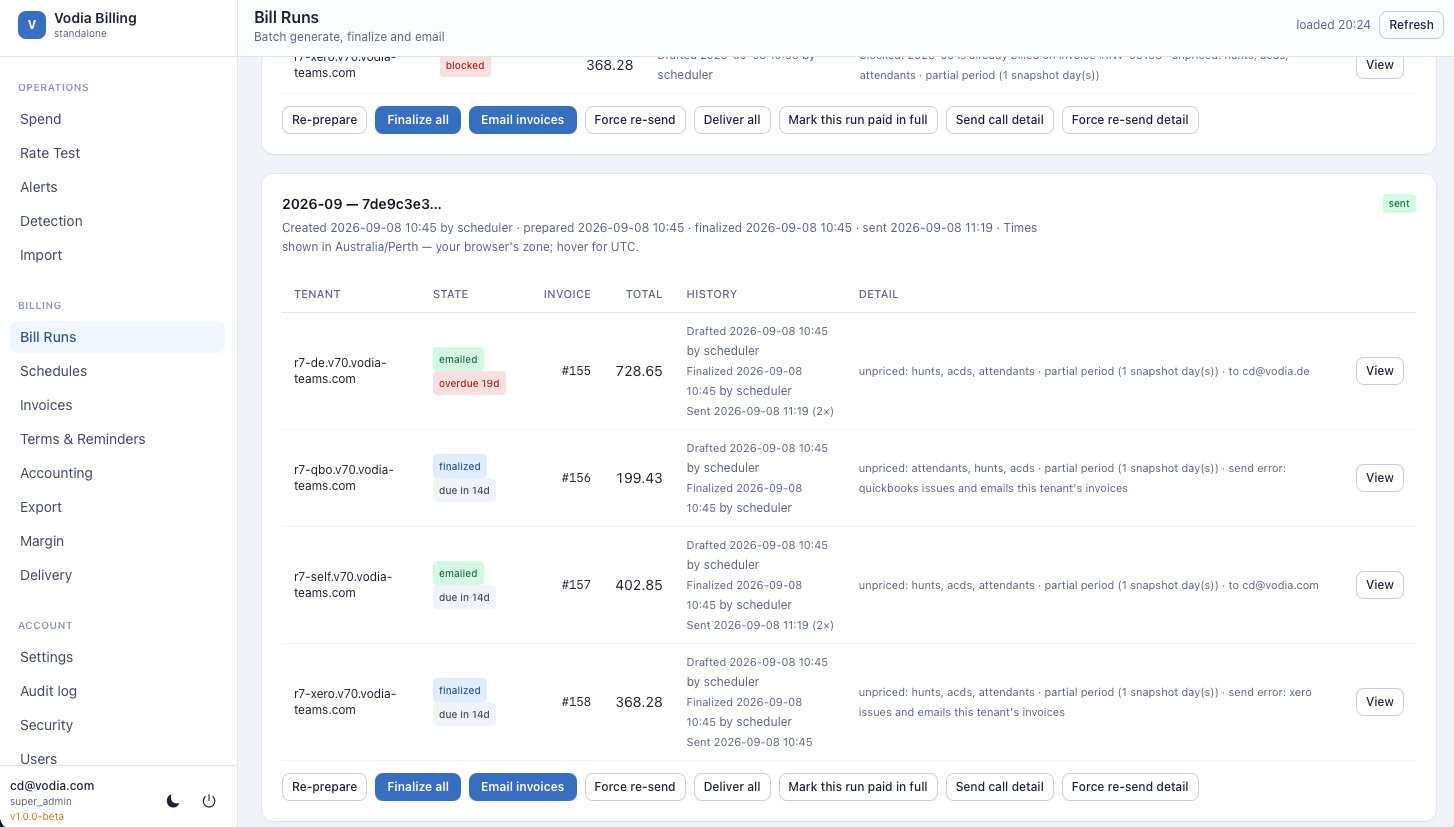
The run detail shows, per customer: its members, stage reached, invoice number if allocated, blockers if any with the member that caused them, stranded charges from inactive members, send state, push state and export state.
If every customer in a run is blocked, the run reports the sent stage with a
timestamp even though nothing was sent. Check the per-customer results rather
than the run's stage badge alone.
Worked examples
A drafts-only run
The right configuration for a first month, and for the whole parallel-run period:
Bill run 2026-08   stages: prepare only

  Northwind Group (3 sites)      DRAFT     804.57 + 82.72 = 887.29
  Westfield Ltd                  DRAFT   1,108.00 + 96.60 = 1,204.60
  Branch Systems                 BLOCKED   branch.northwind-example.com: no sell plan
  Eastern Telecom (2 sites)      BLOCKED   east.northwind-example.com (a41f):
                                             unreviewed trunk carrier-secondary

  2 drafts, 2 blocked, 0 finalized, 0 numbers consumed
No invoice numbers were used. Fix the two blockers and re-run prepare as many times as you like.
The same run, finalized and sent
Bill run 2026-08   stages: prepare, finalize, email

  prepare    4 customers -> 4 drafts, 0 blocked
  finalize   sequential (numbers are fleet-wide and gapless)
               hq       INV-00151     887.29
               west     INV-00152   1,204.60
               east     INV-00153     531.40
               south    INV-00154     642.15
  email        hq       sent   accounts@customer-example.com
               west     sent   ap@west-example.com
               east     FAILED SMTP timeout
               south    sent   billing@south-example.com

  Status: 4 finalized, 3 sent, 1 send failure
Retrying the send stage re-sends only east. Send state is per invoice.
Re-sending an invoice that already sent requires an explicit force, and is audited.
A push that hits the Xero ceiling
Bill run 2026-08   stage: push (Xero, org "Northwind Telecom")

  Day budget:  1,000 calls    Consumed: 996    Remaining: 4
  Pushed:      331 customers
  Remaining:   68 customers — budget exhausted, resume tomorrow
  Blocked:     3 customers
                 acme-east      no accounting mapping
                 acme-west      already pushed
                 acme-south     no due date
The run stopped cleanly and said what is left. At roughly three API calls per tenant, 1,000 calls is about 330 tenants per organisation per day.
A schedule
| Field | Example |
|---|---|
| Day of month | 1 |
| Hour | 3 |
| Timezone | America/New_York |
| Prepare | always |
| Finalize | ✓ |
| ✓ | |
| Export | ✓ |
2026-09-01 03:00  schedule fired for period 2026-08
2026-09-01 04:00  schedule tick — period 2026-08 already run, skipped
2026-09-01 05:00  schedule tick — period 2026-08 already run, skipped
The period it last ran is stored and compared before anything is created. A container restart inside the firing hour cannot produce a second run or a second set of invoice numbers.
For the first month, leave finalize, email and export unticked. That produces the drafts-only run above.