Commissioning
The order of these steps matters. Each depends on the one before it, and doing them out of order produces a system that looks configured but bills nothing, or bills the wrong thing.
Nothing is billed until you explicitly say so. Trunks default to non-billable, tenants have no plan until you assign one, and a tenant with no plan produces no charges. That is deliberate: the safe default is an empty bill, not a wrong one.
1. Add the PBX
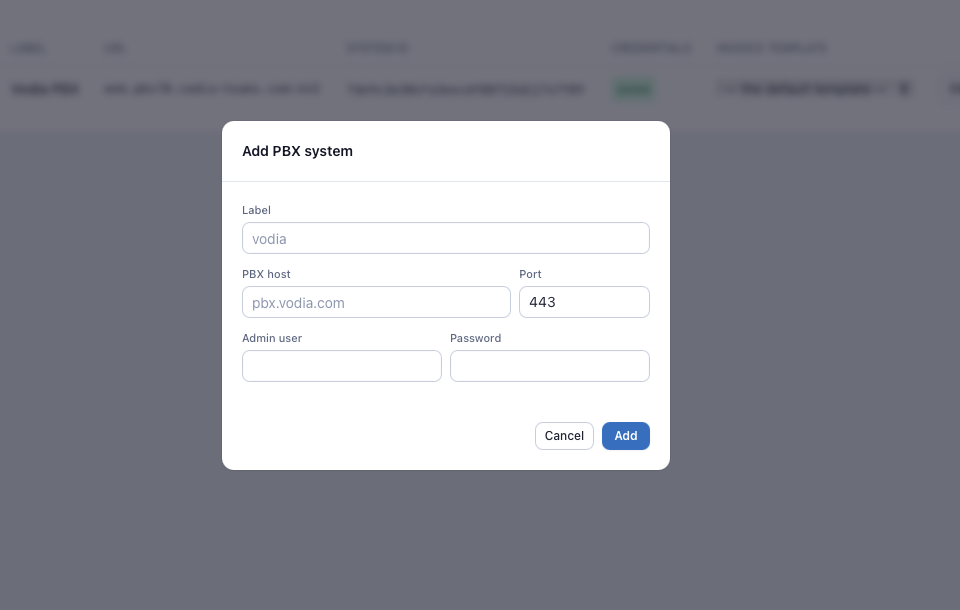
Systems → Add system.
- Label — anything you will recognise
- PBX URL and port — the PBX web interface, typically port 443
- Admin user and password — the dedicated account you created for
Vodia Billing. The password is encrypted at rest under
ENCRYPTION_KEYand is never returned to the browser.
Save, then use Test connection to confirm the credentials work before going further.
2. Set the system ID
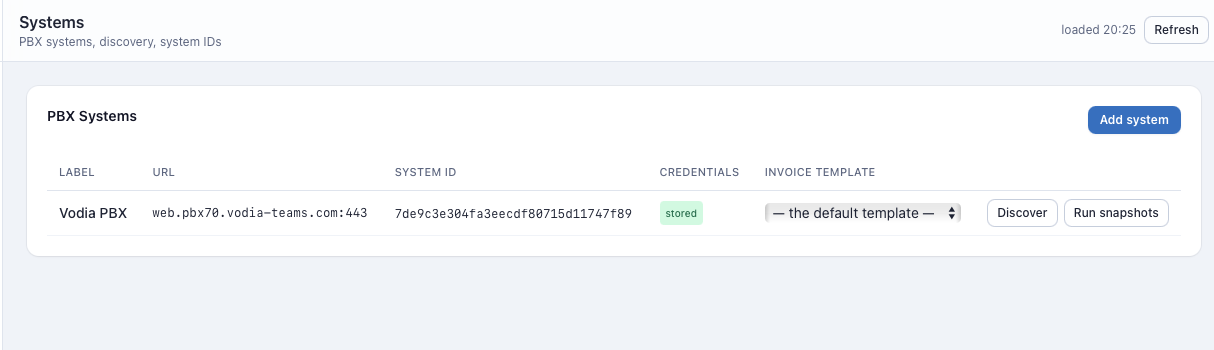
Every CDR the PBX sends carries a system field, a hash identifying that PBX.
Vodia Billing matches incoming CDRs to a configured system by that hash, and
drops records from systems it does not recognise rather than guessing.
If you know the hash, enter it on the system. If you do not:
- Point the PBX CDR URL at Vodia Billing (see step 8).
- Make one test call.
- Open Spend and read the ingest counters. An unrecognised system is counted and its hash shown.
- Paste it into the system record.
3. Discover
Systems → Discover on the saved system.
Discovery pulls three things in one pass:
- Domains — each becomes a candidate billing tenant
- Trunks — only trunks the PBX owns (
own: true), deduplicated - DID lists — the numbers assigned to each domain
The result reports counts per domain. Check the number count: a domain showing zero numbers will match no number-based recurring charges, and it is much better to notice that now than on an invoice.
DID payloads have been observed from Vodia PBX as objects keyed did, as
objects keyed number, and as plain strings. Parsing is tolerant of all
three. Anything unrecognised is counted and surfaced rather than silently
becoming a number that matches nothing.
4. Classify trunks
Trunks.
Every discovered trunk starts non-billable. Review each one and choose:
- Billable — calls over this trunk are rated and charged. Carrier trunks.
- Transit — calls are recognised but not charged. Inter-office links, federation trunks.
- Non-billable — ignored entirely.
Vodia Billing offers a proposal for each trunk based on its PBX type:
register suggests billable, gateway and options suggest transit. A
proposal is never applied automatically.
The two possible mistakes are not symmetrical. A trunk wrongly marked billable fabricates charge rows that the fraud detectors then read as real traffic, and those rows cannot be un-rated once an invoice exists. A trunk wrongly marked transit leaves a recoverable gap you can fix and re-rate.
So the system asks. Confirm each proposal deliberately.
Trunks can also be placed in groups, which is how you rate the same destination differently depending on which carrier carried it.
5. Create rate plans
Plans.
Create at least two plans:
- A sell plan — what you charge the customer
- A cost plan — what the carrier charges you
Cost plans are optional but without them margin reporting is blank. Vodia Billing never fabricates a zero cost for an unpriced call; blank cost means blank margin, which is honest.
Upload a rate sheet to each plan. Uploads run as a dry run first, reporting row counts, rejected rows and the effect on existing destinations. Only then do you commit. See Rate Plans and Sheets for the file format.
6. Build a tax profile
Tax.
Create a tax profile describing the components that apply to your customers — a sales tax across all buckets, a regulatory fee on usage only, a flat per-entity charge on recurring. Then apply it to tenants.
Skip this step for tenants that will be connected to QuickBooks Online, which computes its own tax. See Tax.
7. Configure tenants
Tenants. For each domain you intend to bill:
- Currency
- Sell plan and, if you have one, cost plan
- Tax profile, unless the accounting package owns tax
- Billing recipients — one or more email addresses. A tenant with none is
reported as
no_recipientsduring a bill run and is never skipped silently. - Timezone — used for invoice period boundaries and out-of-hours fraud windows
- Invoice template — branding and language
- Account reference — your own customer identifier, matched to the PBX
parm1field
A domain you leave unconfigured is simply not billed.
8. Point the PBX at Vodia Billing
In the PBX, append Vodia Billing to the CDR URL. The field is space-delimited, so an existing Analytics receiver keeps working:
webcdrs://analytics.example.com/cdr webcdrs://billing.example.com/cdr
9. Rate Test
Rate Test. Before any invoice exists, test known numbers.
Enter a destination number and a tenant. Vodia Billing shows which rate row matched on both the sell and the cost side, the charge type, the increments applied, and the resulting price for a given duration.
Test at minimum: a local number, a national number, a mobile number, an international number, a premium number, and a number you expect to be free or included. If any of those surprise you, fix the sheet now.
10. Verify archive recovery
This is the step people skip, and it is the one that settles a question you cannot answer any other way.
Import an archive CSV for a day that Vodia Billing has already received by
webhook, as a dry run. The result must report essentially everything as
already_rated.
If it instead reports a large number of new legs, the archive's timestamps are being interpreted in a different timezone from the webhook's, and every recovery import you ever do will double-bill or mis-period. Better to find that on a dry run than on an invoice.
11. First bill run: drafts only
Schedules or Bill Runs, with finalize, email and export all unticked.
That prepares drafts and nothing else. Read them. Compare against whatever you were billing before. Only when they agree should you enable finalization.
See Replacing an existing system.
Checklist
The same list, condensed, for printing. Every item is something that silently produces an empty or wrong invoice if skipped.
-
.envbacked up off the server - PBX added, Test connection green
- System ID set —
unknown_systemno longer climbing - PBX CDR URL appended,
acceptedclimbing - Discover run; domain, trunk and number counts all sane
- Every carrier trunk classified billable ← the one everybody forgets
- Internal trunks classified transit
- Sell plan created, rate sheet committed after dry run
- Cost plan created, or margin accepted as blank
- Catch-all row present and deliberately priced, or deliberately absent
- Recurring rates for every entity subtype in use — hunt groups and
auto attendants need their own rows,
ext:*does not cover them - Number prefixes priced, and the tenant's DID list not empty
- Tax profile built and applied to the tenant
- Tenant currency, plan, timezone, recipients and template set
- Rate Test run on six representative numbers
- Archive CSV dry-run import reports
already_ratedfor a day already received by webhook - First bill run done drafts-only, and the draft checked by hand against Worked Example
- Fraud thresholds reviewed; automatic response left in report mode
- If offering card payment: Stripe key tested, webhook endpoint added and its signing secret saved, one test payment made end to end
→ Quick Start has the same sequence with a worked example at each step.