Admin Panel
The Admin panel is available to users with the super_admin or admin role. It provides management interfaces for users, API keys, security settings, and platform configuration.
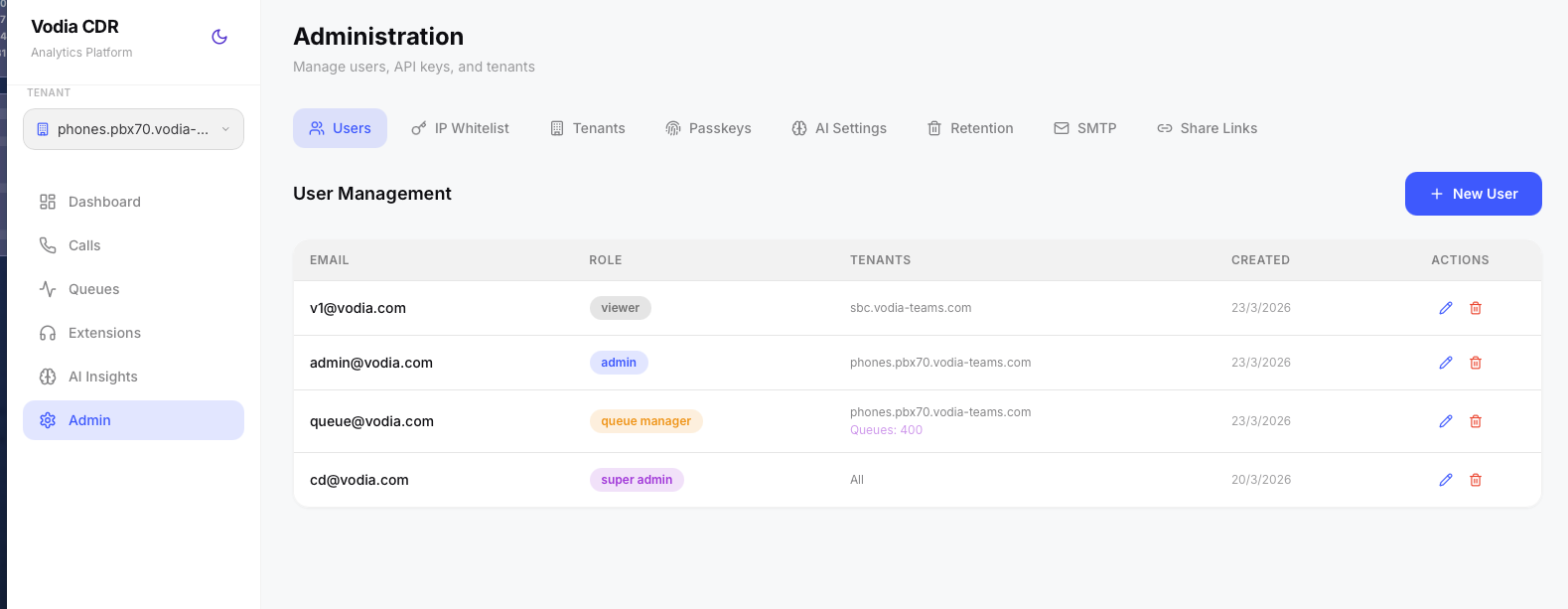
Users
Create and manage user accounts. Each user has:
- Email — used as login username
- Role —
super_admin,admin,viewer, orqueue_manager - Tenants — the PBX domains this user can access (multi-select)
- Queues — (queue_manager only) which queues this user can see
Users can be created, edited (pencil icon), and deactivated. The edit form allows changing role, tenant assignments, queue assignments, and resetting passwords.
Role permissions:
| Role | Dashboard | Calls | Queues | Extensions | AI Insights | Live | Admin |
|---|---|---|---|---|---|---|---|
| super_admin | All data | All data | All data | All data | All data | All data | Full access |
| admin | Tenant data | Tenant data | Tenant data | Tenant data | Tenant data | Tenant data | Tenant admin |
| queue_manager | Queue-scoped | Queue-scoped | Queue-scoped | Queue-scoped | Queue-scoped | Queue-scoped | No access |
| viewer | Tenant data | Tenant data | Tenant data | Tenant data | Tenant data | Tenant data | No access |
Admins can create viewer and queue_manager accounts. Only super admins can create admin or super_admin accounts.
New users receive a temporary password valid for 24 hours and are prompted to reset on first login.
Tenants
View and configure PBX tenants. Tenants are auto-created when a PBX system sends its first CDR. Each tenant can be configured with:
- Default Country — used by libphonenumber to parse local-format numbers (e.g.
AUfor Australian tenants) - International Prefix — the dialing prefix for international calls (e.g.
0011for Australia,011for US) - Show Country Flags — toggle country flag emoji display next to phone numbers on the Calls page
- Display Timezone — all dates and charts for this tenant display in the configured timezone. Leave empty to use each user's browser local time. Accepts any IANA timezone name (e.g.
Australia/Sydney,America/New_York,Europe/London). When set, an orange timezone pill appears in the sidebar as a reminder.
These settings affect how phone numbers are normalized, country-detected, and displayed.
The Tenants table also displays each tenant's current retention period and timezone for quick reference. A search filter allows finding tenants by domain name.
Bulk Updates: Use the "Apply to All" bar to set the default country, international prefix, or country flags across all tenants at once. This is useful when onboarding multiple PBX systems in the same region.
IP Whitelist
Configure which PBX server IP addresses are allowed to submit CDR and recording data without API key authentication. The whitelist is seeded from the value provided during installation and can be modified here. IPs are stored in the database and cached in Redis for fast lookup.
Whitelisted IPs also bypass rate limiting to ensure high-volume PBX servers can submit CDRs without throttling.
When the whitelist is empty, all IPs are allowed (API key authentication still applies).
PBX Live Connection
Create a dedicated administrator account on your Vodia PBX for use with Vodia Analytics. To restrict access, whitelist the Vodia Analytics server's IP address on your PBX so that only this IP can authenticate using the dedicated admin credentials.
Each whitelisted IP entry can optionally be configured for real-time WebSocket connectivity, which powers the Live page. Expand any IP entry and enable Live Connection to configure:
- PBX Hostname — the PBX server address
- PBX Port — WebSocket port (typically
443) - Admin User — PBX admin username for session authentication
- Admin Password — PBX admin password (encrypted at rest with AES-256-GCM)
- Domains — automatically populated as CDRs arrive from this PBX
A Test Connection button verifies the PBX credentials and WebSocket connectivity before saving. The test performs the full three-step session authentication flow (create session → activate → WebSocket handshake) to confirm everything works.
Once configured, the platform maintains a persistent WebSocket connection to the PBX, subscribing to call-state events, wallboard updates, and BLF (busy lamp field) status for all agents. Connections automatically reconnect on interruption with exponential backoff.
Passkeys & Two-Factor Authentication
Register and manage WebAuthn passkeys (fingerprint, face, security key) for passwordless login. Users can register multiple passkeys for different devices. A passkey prompt banner appears on the dashboard after each login until a passkey is registered.
Two-Factor Authentication (2FA) can be enabled or disabled per user from this tab. When enabled, the user is required to set up a TOTP authenticator app (such as Google Authenticator, Authy, or 1Password) on their next login. After setup, a six-digit code from the authenticator app is required at each login in addition to the password. Admins can deactivate 2FA for a user if they lose access to their authenticator device.
SMTP Settings
Configure an outbound SMTP server for sending share link emails, scheduled briefings, and future notification features.
- Host — SMTP server hostname
- Port — typically 587 (STARTTLS) or 465 (SSL)
- Username / Password — SMTP credentials (password encrypted with AES-256-GCM at rest)
- From Address — the sender email address
- Encryption — STARTTLS, SSL, or None
A Test Email button validates the configuration by sending a test message to a specified recipient.
Briefings (Scheduled Reports)
Schedule AI-generated briefings to be created and emailed automatically. Briefings use the same AI engine as the ✨ AI Briefing button on the Dashboard, Queues, and AI Insights pages — but run on a schedule with no manual action required.
Scheduled briefings are delivered by email, so SMTP must be configured (see SMTP Settings above) and an AI provider must be set up (see AI Settings below).
Each schedule is configured with:
- Tenant — a specific PBX tenant, or All Tenants for a platform-wide briefing. Scheduled times run in the selected tenant's configured timezone (falling back to your browser timezone for All Tenants).
- Briefing — which report to generate: Dashboard (overall call activity), Queues (queue performance), or AI Insights (sentiment and topic trends)
- Frequency — daily, weekly (with day of week), or monthly (with day of month, 1–28)
- Hour — the hour of day (0–23) the briefing is generated and sent
- Data Range — the rolling window of call data the briefing covers: last 24 hours, last 7 days, or last 30 days
- Recipients — one or more email addresses (comma-separated)
The schedule list shows each schedule's tenant, recipients, next run time, and the status of the last run (including how many emails were delivered). Schedules can be edited, deleted, or triggered immediately with the Run Now (▶) button — useful for verifying the configuration before the first scheduled run.
The scheduler checks for due briefings every five minutes. Generated briefings are also stored in the platform's briefing history, alongside briefings generated manually from the sparkle button.
Tenant-scoped admins only see their own tenant in the tenant selector and only see schedules for their tenant.
Storage
Configure where call recordings are stored. Recordings are in uncompressed Linear Stereo WAV format and can consume significant disk space. Two storage backends are supported:
- MinIO (Local) — the default. Recordings are stored in a MinIO container running alongside the platform. No additional configuration needed.
- S3 / Spaces — external S3-compatible storage such as AWS S3, DigitalOcean Spaces, or Backblaze B2. We recommend configuring an external provider to offload recording storage on busy systems.
When configuring S3, provide the endpoint URL (required for non-AWS providers, leave blank for AWS S3), region, bucket name, access key, and secret key. Credentials are encrypted at rest using AES-256-GCM. A Test Connection button verifies credentials and bucket write access before saving.
Switching storage backends only affects new recordings. Existing recordings remain accessible on their original storage — each recording tracks which backend it was stored on, so MinIO and S3 recordings can coexist seamlessly.
The Storage tab also displays current usage across all backends — total size, file count, and a per-tenant breakdown. Usage is cached for 30 minutes and can be refreshed manually.
Audit Log
A full audit trail of administrative actions across the platform. All events are retained for one year and automatically purged thereafter.
Events logged include:
- Authentication — login success and failure, 2FA verification, passkey verification
- Users — user created, updated, deactivated
- Tenants — tenant settings updated, tenant deleted
- IP Whitelist — whitelist saved
- Settings — SMTP, AI provider, OpenAI key, and storage configuration changes
- Compliance — compliance rules created/updated/deleted, preset packs seeded, redaction and QA settings changed, historical re-evaluation triggered
- Briefings — briefing schedules created and deleted
- Retention — retention policy updated, GDPR purge triggered, retention sweep run
The log can be filtered by category and date range, and is paginated. Expanding any row shows additional detail such as which fields changed or how many records were affected. The Audit Log is visible to super_admin users only.
Share Links
View and manage all active (unexpired, unviewed) share links. Each entry shows the call ID, domain, who created the link, creation time, expiry time, and whether it has been viewed. Links can be copied or revoked.
Share links are one-time use — they expire after first viewing or after 24 hours, whichever comes first. Expired and viewed links are automatically cleaned up by a MongoDB TTL index.
AI Settings
Configure the AI provider used for call summarization and sentiment analysis. Four providers are supported:
- OpenAI — GPT-5.4 Mini (default), GPT-5.4, GPT-5.5
- Anthropic Claude — Claude Sonnet 4.6 (default), Claude Opus 4.8, Claude Haiku 4.5
- Google Gemini — Gemini 3.5 Flash (default), Gemini 3.1 Flash Lite, plus Gemini 2.5 Flash and Gemini 2.5 Pro as fallbacks
- Ollama (Experimental) — self-hosted models such as Llama 3, Mistral, Gemma 2, or any custom model. Requires a separate Ollama server (can be a dedicated VM) and no API key — just the server URL.
Each provider requires an API key (except Ollama) which is stored encrypted in the database. OpenAI also supports a custom endpoint field for use with OpenAI-compatible APIs such as Azure OpenAI or local proxies.
A Test Connection button verifies the configured provider and credentials are working before saving.
Auto-Summarize can be toggled per tenant. When enabled, every new call recording is automatically transcribed locally using Whisper (free, always on) and then summarized via the configured AI provider — generating sentiment analysis, topic extraction, action items, and resolution detection. A search filter allows finding tenants by domain name.
Only one AI provider is active at a time. Changing the provider affects on-demand summarization, auto-summarize, compliance AI rules, QA scoring, and scheduled briefings for all tenants.
Data Retention
Configure how long call data is retained per tenant. Options range from 30 days to 7 years, or forever. A daily sweep job automatically purges calls, recordings, transcripts, and associated files older than the configured retention period.
A search filter allows finding tenants by domain name, and the "Apply to All" bar sets retention across all tenants at once — useful when a uniform policy is required.
The Run Retention Sweep Now button triggers an immediate sweep without waiting for the daily schedule.
GDPR Purge
Purge all records associated with a specific phone number across all collections (calls, recordings, transcripts, share tokens). This supports GDPR right-to-erasure requests.